
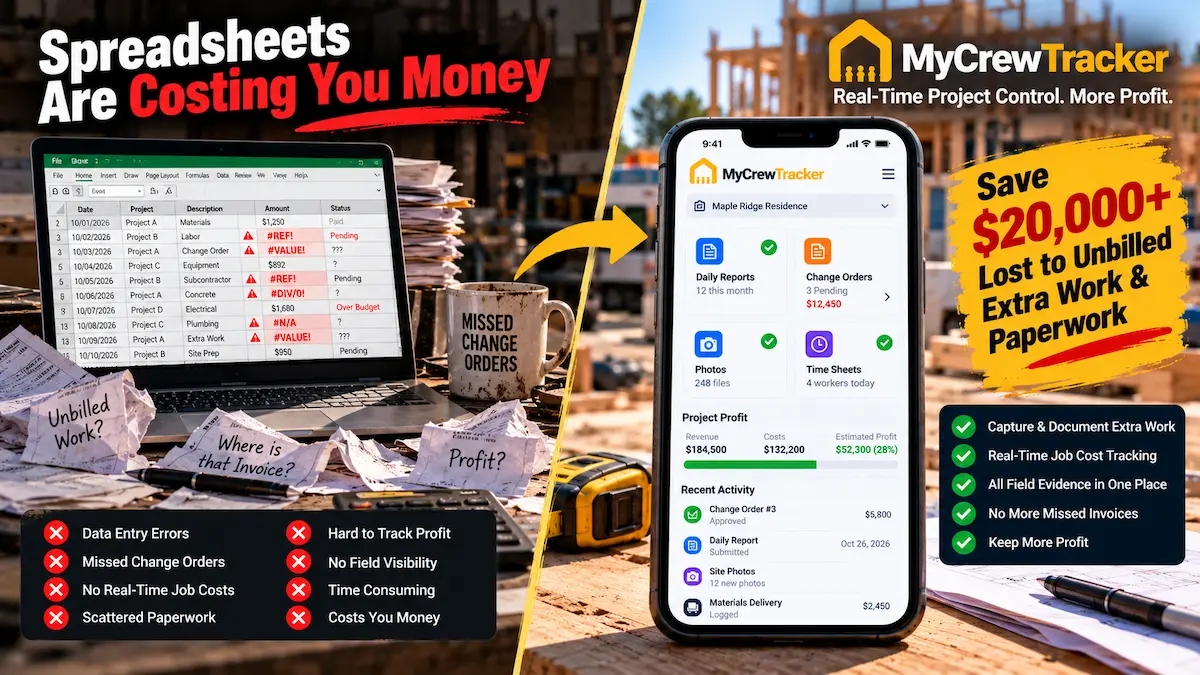
Ask almost any independent general contractor, residential remodeler, or specialty trade business owner how they manage their company's field records, and you will hear a familiar answer: "We just use Microsoft Excel and Google Sheets. It's free, everybody knows how to open it, and we don't have to pay another monthly software subscription."
On the surface, this reasoning sounds financially prudent. When you are running a tight construction operation with five to twelve crew members, dodging unnecessary technology overhead feels like smart cash-flow management. Microsoft Excel is undoubtedly one of the greatest calculation engines ever built; for high-level tax planning, multi-trade bid estimating, and annual balance sheet reviews, it remains an indispensable tool.
However, when contractors attempt to run daily field operations, time tracking, job photos, and contract documentation through spreadsheets, the definition of "free" completely breaks down.
In 2026, spreadsheets do not save small construction businesses money. They silently drain between $40,000 and $70,000 in lost profits every single year through unbilled extra work, disputed weather delays, payroll transcription errors, and hours of administrative evening data entry.
Below is a forensic analysis of why construction spreadsheets fail in the field, a line-by-line financial autopsy of where your cash actually leaks, and an operational playbook for transitioning your crew to modern field documentation software without mutiny on the job site.
The Dangerous Allure of "Free": Why 68% of Small Contractors Start with Excel
Industry surveys indicate that over 68% of small general contractors and trade subcontractors with fewer than 15 employees rely on spreadsheets as their primary operational database. The reasons for this widespread adoption are obvious:
- Zero Perceived Incremental Cost: You already have a Microsoft 365 or Google Workspace account. Creating a new tab named
2026_Jobs_Master.xlsxcosts exactly zero dollars on your monthly credit card statement. - Infinite Customization: If you want to add a column for "Subcontractor Insurance Expiration" or "Permit Status," you simply right-click and insert a column. No software developer or customer support ticket required.
- Universal Familiarity: Every project manager, estimator, and bookkeeper knows the basic layout of a spreadsheet grid.
This setup works reasonably well under one specific condition: when the business owner is on the job site 100% of the time, managing a single project with two trusted helpers. At that boutique scale, the owner holds the entire project in their head; the spreadsheet is merely a glorified digital notepad.
The crisis occurs the moment your business succeeds and begins to scale. When you expand from one active job to four concurrent projects, manage two separate field foremen, coordinate six trade subcontractors, and hire seasonal apprentices, the spreadsheet breaks under the weight of real-world jobsite chaos.
The 5 Ways Spreadsheets Break Down on Dusty Construction Sites
A spreadsheet was designed for an accountant sitting at a desk with an ergonomic mouse, full-sized keyboard, and 4K display. It was never engineered for a framing lead or HVAC foreman holding an iPhone with dusty work gloves under direct noon sunlight.
Here are the five fatal operational friction points where construction spreadsheets reliably collapse:
Accidental Formula Overwrites & Silent Calculation Errors
In a shared Google Sheet or desktop Excel file, all it takes is one tired foreman dragging a finger across a touchscreen or accidentally typing an hour entry into a cell that contains a =SUM(D4:D28) formula. The formula is permanently overwritten with a static number. Because spreadsheets do not flag broken cell logic, the error remains completely invisible until the end of the month, when your job costing reports show that you miraculously spent $8,000 less on labor than your bank account actually paid out.
Version Chaos & the "Final_Final_v3.xlsx" Nightmare
When field supervisors download a local copy of an Excel file to view it offline in a basement or dead zone, they create a divergent data branch. The project manager in the office updates customer change orders on the server copy, while the site foreman logs extra sub hours on his local mobile download. When the foreman emails his file back, someone has to manually merge two competing versions line by line. Inevitably, critical field notes are accidentally overwritten and erased.
Inability to Bind Timestamped Photo Proof to Line Items
You cannot effectively embed high-resolution, GPS-geotagged progress photos inside a spreadsheet cell. When an owner disputes an invoice for unforeseen subsurface rock excavation or damaged plumbing pipes, a text note in cell B14 that says "hit rock 4hrs" carries zero legal weight. In construction disputes, documentation without photographic metadata and certified weather stamps is routinely dismissed by arbiters and insurance carriers.
Zero On-Site Client E-Signatures for Extra Work
When a client asks your framing lead on site to add a recessed tray ceiling or re-route structural joists, your lead cannot hand the homeowner a spreadsheet and ask for an legally binding digital signature on the tailgate. Instead, the crew completes the work on a verbal nod, the foreman scribbles a note in his personal notebook, and by the time the office creates an invoice three weeks later, the client has "forgotten" the conversation and refuses to pay.
Unusable Mobile Ergonomics (Pinch-and-Zoom Frustration)
Trying to navigate a 30-column, 200-row spreadsheet on a 6.1-inch smartphone screen requires endless horizontal scrolling, aggressive pinch-zooming, and microscopic tap targets. Field workers despise doing it. After three days of squinting in the sun, your foremen simply stop updating the spreadsheet altogether, forcing the business owner into late-night phone tag to reconstruct what happened on the job site.
The $50,000 Financial Autopsy: Quantifying the Annual Cost of Excel
Most contractors believe their spreadsheet system is cost-free because no software subscription appears on their credit card statement. But when you track where small construction firms actually lose revenue, the hidden cost of spreadsheet management is staggering.
Below is a realistic, conservative financial autopsy for a typical residential general contractor or commercial subcontractor with 1 owner, 1 office administrator, and 6 field crew members doing $1.5M in annual volume:
| Operational Leakage Category | How the Spreadsheet Fails | Conservative Annual Cash Loss |
|---|---|---|
| Unbilled & Forgotten Change Orders | Verbal directives and paper field notes get lost before making it onto the billing sheet. Foremen perform out-of-scope work without signed client approval. | $18,500 / year |
| Payroll Padding & Time Transcription Errors | Workers round up hours on manual timecards. Bookkeepers spend hours re-typing scribbled slips into QuickBooks, introducing manual calculation errors. | $8,640 / year |
| Material Rework from Outdated Blueprints | Field crew frames walls using an outdated PDF or spreadsheet spec sheet while the revised plan sits on the office desktop. | $12,400 / year |
| Disputed Weather Delays & Liquidated Damages | General contractor denies weather extension claims because manual spreadsheet notes lack certified, third-party NOAA meteorological proof. | $7,500 / year |
| Owner & Administrator Evening Data Entry | Company owner and bookkeeper spend 4 hours each week deciphering texts, re-entering data, and reconciling conflicting sheets at a $50/hr labor rate. | $10,400 / year |
| Total Annual Cost of "Free" Spreadsheets: | $57,440 / year | |
When you view the numbers in black and white, the irony becomes obvious: to avoid spending $480 a year on dedicated construction documentation software, this business sacrificed over $57,000 in net profit.
The Hybrid Playbook: What to Keep in Excel vs. What to Move to Field Software
Modernizing your construction business does not mean you have to burn all your spreadsheets. The most profitable contractors run a pragmatic Hybrid Operating Model: they use Excel where it excels, and deploy dedicated field software where spreadsheets fail.
What to Keep in Excel (Office-Only)
- ✓ Complex Custom Estimating: Heavy multi-trade formula models with proprietary unit pricing matrices.
- ✓ Annual Financial Forecasting: 12-month cash flow projections, tax depreciation schedules, and overhead calculations.
- ✓ Company Asset Depletion: Tracking vehicle depreciation, capital equipment purchases, and loan amortization.
What to Move to MyCrewTracker (Field & PM)
- ✓ Daily Construction Reports: 90-second voice logs, automated NOAA weather, and contractor sign-offs.
- ✓ Contractual Change Orders: Instant on-site client e-signatures before extra work begins.
- ✓ GPS Time Tracking & Timesheets: Geofenced clock-ins synced directly to QuickBooks Online.
- ✓ Jobsite Photo Archives: High-resolution, geotagged photos filed directly into project folders.
- ✓ Smart AI Spec & Plan Search: Blueprint retrieval and natural-language architectural spec queries.
Head-to-Head Comparison: Spreadsheets vs. MyCrewTracker Easy Desk
Here is how manual spreadsheets compare against MyCrewTracker's Easy Desk mode across core daily construction workflows:
| Capability / Workflow | Excel / Google Sheets | MyCrewTracker (Easy Desk) |
|---|---|---|
| Mobile Data Entry Speed | Slow (8-12 mins, pinch-zoom, typing required) | Fast (Under 90 secs, voice-to-text cards) |
| Data Integrity & Formula Protection | High risk (Formulas easily overwritten) | 100% Protected (Locked relational database) |
| Weather Delay Documentation | Manual text entry (Easily challenged in court) | Automated NOAA certified weather stamps |
| Client Change Order E-Signatures | Impossible on site (Requires printing or third-party app) | Instant digital signature capture on phone screen |
| Job Photo Integration | Clunky (Blows up file size or links to broken drives) | Unlimited photos, GPS geotagged and project-filed |
| QuickBooks Online Sync | Manual copy-pasting (Double entry errors) | One-click bidirectional payroll & invoice sync |
| Offline Field Access | Causes divergent file versions and sync conflicts | Seamless local cache with automatic cloud sync |
| Blueprint & Spec Search | None (Requires digging through separate PDF folders) | Smart AI natural language search across 100+ pages |
| Software Subscription Cost | "Free" (Costs $57,000+ in hidden leakage) | Flat $40/mo ($480/yr) with unlimited users |
The Afternoon Transition Guide: Moving Off Spreadsheets Without Crew Revolt
The number one fear stopping contractors from abandoning spreadsheets is crew pushback. Business owners worry: "My lead carpenter has been using a clipboard and flip phone for twenty years. If I force a complex new app on him, he'll quit or refuse to use it."
That fear is valid when dealing with bloated enterprise platforms like Procore or Buildertrend. But transitioning to MyCrewTracker takes less than an afternoon because of Easy Desk mode:
- Hour 1 — Set Up Your Active Projects: Log into MyCrewTracker Pro Mode on your computer. Enter your current active jobs, upload your PDF plan sets, and connect QuickBooks Online in two clicks.
- Hour 2 — Invite Your Crew: Send invite links to your foremen and crew members. Because MyCrewTracker has unlimited user accounts, you never have to decide who gets a seat.
- Hour 3 — The 5-Minute Tailgate Huddle: Show your foremen Easy Desk on their phones. Point out the five main visual cards: Clock In, Daily Log, Take Photo, Change Order, Punch List. Have each lead practice speaking a 10-second voice note into the Daily Log card.
- Day 1 — First Log Sent: At 4:00 PM, your foremen tap submit on their daily logs. Today's hours, NOAA weather, and site photos automatically arrive in your office dashboard.
Your field crew will not revolt because Easy Desk actually makes their lives easier. They no longer have to spend 20 minutes deciphering paperwork or answering late-night text messages from the owner.
Frequently Asked Questions: Replacing Construction Spreadsheets
Can I import my existing Excel cost codes and project lists into MyCrewTracker?
Yes. You can import your standard CSV or Excel cost codes, customer lists, and project templates directly into MyCrewTracker in seconds. Even better, if your customers and items are already in QuickBooks Online, connecting QuickBooks automatically populates your projects without any manual data entry.
What if my older subcontractors don't know how to use apps?
Unlike enterprise tools that require passwords, two-factor authentication apps, and multi-step permissions, MyCrewTracker allows you to send trade subcontractors direct web links for punch lists or daily sign-offs. They can view tasks, upload completion photos, and sign off directly from any mobile browser without downloading anything or remembering passwords.
Will our monthly software cost increase when we hire more workers?
No. Most construction apps charge between $10 and $45 per user per month, punishing you for growing. MyCrewTracker costs a flat $40/month billed annually ($480/yr) or $60/month month-to-month. You get unlimited users, unlimited active projects, and unlimited document storage on every plan.
What happens to our historical job records if we cancel?
You own 100% of your data. At any time, you can export your complete project documentation—including signed daily reports, weather logs, photos, and change orders—as organized, indexed PDF archives and CSV files with a single click.
The Final Verdict: Stop Subsidizing "Free" Excel with Lost Project Margins
Continuing to manage your construction field operations with spreadsheets is not saving your company money. It is an expensive subsidy that costs your business tens of thousands of dollars in unbilled change orders, payroll padding, and endless evening administrative stress.
Keep Excel for what it does best: complex estimating formulas and high-level tax planning. But give your field crew the modern tool they deserve to capture contemporaneous proof, protect your cash flow, and guarantee you get paid for every hour worked.
Graduate from Spreadsheets to 90-Second Field Proof
Replace spreadsheet chaos with Easy Desk: automated daily logs, mobile change orders, and GPS time tracking synced to QuickBooks. Unlimited users for just $40/month.
