
For small general contractors, custom remodelers, and specialty trade subcontractors, the daily construction log is not just administrative paperwork—it is your company's primary legal shield. When a general contractor claims liquidated damages for project delays, when an owner disputes an unforeseen site condition, or when an insurance carrier investigates a water intrusion claim, your contemporaneous daily field log is the single document that determines whether you get paid or absorb a catastrophic loss.
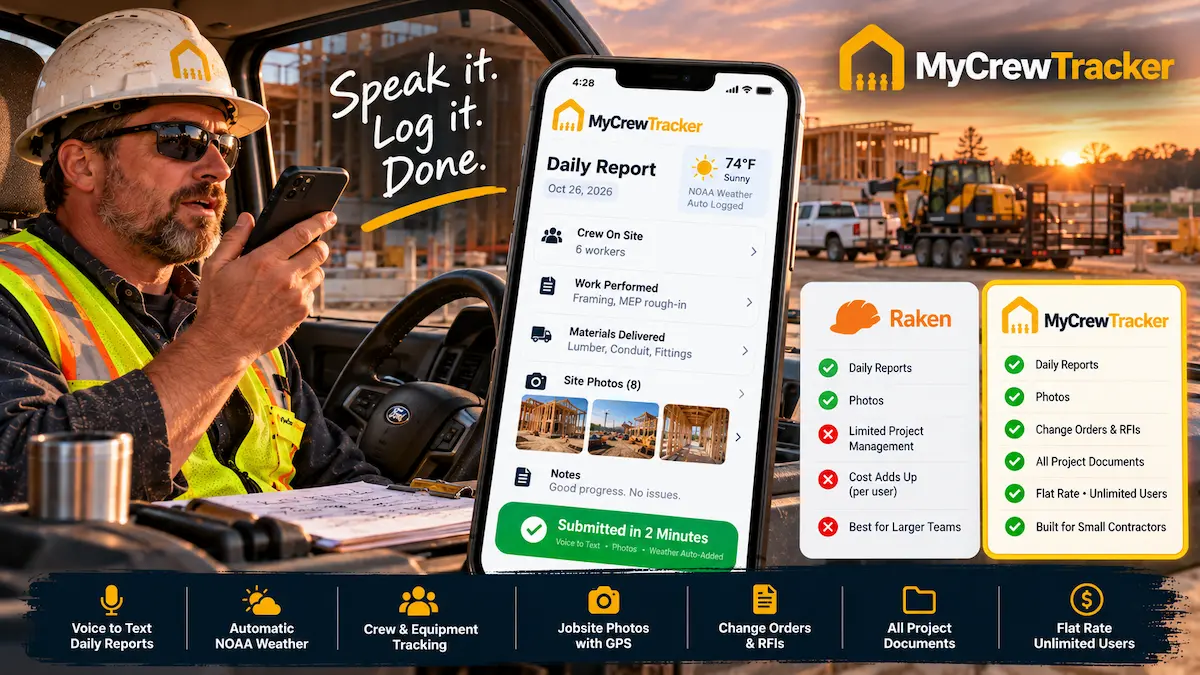
In the daily reporting category, Raken has earned strong brand recognition. Built specifically around mobile field reporting, it gained popularity by replacing cumbersome paper logs with voice dictation, photo attachments, and automated weather stamps.
However, as we move through 2026, small contractors are increasingly questioning Raken's value proposition. While Raken excels at generating clean daily log PDFs, trade crews run into two major roadblocks:
- The Per-User Pricing Trap: Raken hides pricing behind mandatory sales calls and charges per user per month ($15 to $43+/seat/month on annual contracts). As your team grows to 10 or 15 field and office workers, your annual bill escalates to $3,500 to $6,000+ each year strictly for daily logs and time tracking.
- Where Daily Logs Stop and Legal Protection Begins: Logging a weather delay or unforeseen site obstacle in a daily report is useless if you cannot immediately issue a contractual Change Order and capture an on-site client signature before unbilled extra work begins. Raken lacks contractual change order management, RFI tracking, and drawing spec navigation.
That is why contractors are adopting MyCrewTracker. At a flat $40/month billed annually ($480/yr) or $60/month month-to-month with unlimited users and unlimited projects, MyCrewTracker delivers a 90-second mobile daily report with automated NOAA weather—combined with mobile change order e-signatures, time tracking, QuickBooks sync, and Smart AI spec search.
The Legal Reality: Why Contemporaneous Daily Logs Defeat Delay Claims
In construction litigation and American Arbitration Association (AAA) proceedings, the legal doctrine of contemporaneous evidence is king. Under the Spearin Doctrine and standard AIA/ConsensusDocs contractual frameworks, a contractor seeking an extension of time or delay compensation must prove:
- Exact Meteorological Impact: Certified, third-party weather data showing that precipitation, sub-freezing temperatures, or excessive wind physically prevented productive trade work.
- Contemporaneous Recording: Proof that the delay was logged on the exact date and hour it occurred—not reconstructed from memory weeks later during a dispute.
- Trade Interference Evidence: Documentation showing which preceding trade contractor failed to complete their rough-in or hand over the work area on schedule.
A casual email or a paper calendar entry does not meet these evidentiary standards. Consider a concrete or masonry subcontractor facing a $25,000 liquidated damages assessment for a 10-day schedule overrun. If you try to argue that "it rained a lot in April," arbiters will dismiss your claim. But if you produce certified daily reports proving that on April 3rd, 8th, and 14th, NOAA recorded 2.4 inches of rain and 34°F ground temperatures that prevented concrete curing, the GC is contractually obligated to grant a non-compensable time extension.
Both Raken and MyCrewTracker capture automated weather stamps—but how they charge for that functionality is where their business philosophies diverge completely.
Raken's Pricing Model: What Does "Request a Quote" Really Mean?
Raken does not display clear pricing tiers on its public website. Instead, contractors are routed through a sales qualification funnel. Based on contract data and verified customer reports in 2026, here is what Raken actually costs:
| Raken Tier | Est. Per-User Cost | Annual Cost (10 Users) | Included Capabilities |
|---|---|---|---|
| Basic / Professional | ~$15 – $25 / user / mo | $1,800 – $3,000 / yr | Daily reporting, photos, automated weather, PDF export. |
| Performance Plan | ~$35 – $43 / user / mo | $4,200 – $5,160 / yr | Adds Time Cards, production tracking, equipment logs, and integrations. |
| Safety & Toolbox Talks Add-On | +$5 – $10 / user / mo | +$600 – $1,200 / yr | Pre-built toolbox talk library and safety meeting signatures. |
| MyCrewTracker (All-In-One) | $40 / mo (Flat) | $480 / yr (Flat) | Unlimited users, daily reports, change orders, time sheets, QuickBooks sync, Smart AI spec search. |
The Hidden Penalty of Per-User Licensing
In construction, your daily field log is only as reliable as the field workers reporting to it. When an app costs $35 to $43 per user per month, a small contractor cannot afford to give accounts to 6 trade carpenters, 4 apprentices, and 3 specialty subcontractors.
Contractors respond by buying only 2 or 3 licenses for top superintendents. As a result, the superintendent spends 45 minutes every evening chasing down workers, transcribing notes from crumpled text messages, and guessing crew hours. By offering unlimited users for a flat $40/month, MyCrewTracker allows everyone on your jobsite to record their own presence, photos, and trade tasks directly.
Feature Comparison: Daily Reports, Weather Logs, and Field Speed
How do Raken and MyCrewTracker actually compare when a lead foreman is standing in the rain on a Friday afternoon? Here is the workflow breakdown:
1. Voice-to-Text Daily Reporting
- Raken: Pioneered voice dictation for daily logs. Foremen speak into their phone, and the app transcribes notes into predefined categories (work completed, materials, safety observations). It produces a clean, branded PDF report.
- MyCrewTracker Easy Desk: Optimized for an ultra-fast 90-second routine. With oversized daylight-viewable touch buttons, foremen tap "Daily Report," speak their shift narrative, and the software organizes it into certified sections. Because Easy Desk requires zero training, foremen complete their logs before they leave their work truck.
2. Automated NOAA Weather Synchronization
- Raken: Automatically captures weather conditions three times per day (morning, noon, afternoon) based on jobsite location.
- MyCrewTracker: Automatically pulls official hyper-local NOAA weather records—including high/low temperatures, precipitation totals, relative humidity, and wind gusts. If a concrete pour fails due to freezing temperatures or framing is halted by a torrential storm, your daily log provides certified meteorological proof to defeat owner delay penalties.
3. Jobsite Photos & GPS Verification
- Raken: Attaches photos to daily logs with basic timestamps and tags. However, photo management is primarily designed for daily report attachments rather than a full project photo vault.
- MyCrewTracker: Every photograph snapped in Easy Desk is automatically watermarked with military-grade GPS coordinates, date/time stamps, project phase, and current weather. Photos are not just appended to daily reports—they are permanently indexed in your searchable project archive and can be linked directly to Change Orders, Punch Lists, and RFIs.
4. Crew Attendance & QuickBooks Payroll Sync
- Raken: Time cards and crew tracking require upgrading to their expensive Performance Tier ($35–$43/user/mo). Synchronizing hours to QuickBooks often requires third-party connectors or enterprise exports.
- MyCrewTracker: Digital crew Time Sheets are included on every account. Foremen confirm crew attendance with one tap at 7:00 AM. Total hours and cost codes sync bidirectionally with QuickBooks Online and Desktop, eliminating payroll re-entry for your bookkeeper.
Where Raken Stops and Complete Project Protection Begins
The most critical difference between Raken and MyCrewTracker is not how they record daily reports—it is what happens after an issue is recorded.
The Scope Dispute Reality
Your framing crew opens an exterior wall during a commercial remodel and discovers severed electrical conduits and rotted structural headers. In Raken, your foreman can take a photo and write a note in his daily log: "Discovered rotted headers on 2nd floor, delayed framing 4 hours."
That note creates a historical record, but it does not authorize extra payment. If your crew repairs the header based on a verbal nod from the GC superintendent, the owner will frequently refuse to pay at final billing because no contractual change directive was signed.
In MyCrewTracker, your foreman taps "Change Order," attaches the photos, enters estimated labor hours and materials, and hands the phone to the GC superintendent for an instant on-site digital signature. A legally binding PDF is generated on the spot.
Daily reporting without immediate change order execution leaves contractors vulnerable to unbilled extra work.
Managing Multi-Trade Subcontractors Without Seat Penalties
If you are a General Contractor coordinating trade subcontractors (plumbers, electricians, drywallers), you want every trade lead to submit a daily report. On Raken, inviting 6 trade subcontractors requires buying 6 additional user licenses ($200+/mo).
With MyCrewTracker, you simply send a secure link to your trade subcontractors. They submit their daily headcount, progress notes, and site photos directly into your project file—without costing you an extra dollar in software fees.
Head-to-Head Comparison: Raken vs. MyCrewTracker
| Feature / Capability | Raken (Performance Plan) | MyCrewTracker |
|---|---|---|
| Annual Cost (10 Users) | $4,200 – $5,160 / yr | $480 / yr (Flat Rate) |
| User / Seat Limit | Strictly billed per seat ($35–$43/mo) | Unlimited Users Included |
| Voice-to-Text Daily Logs | Yes (Excellent mobile dictation) | Yes (90-sec Easy Desk workflow) |
| Automated Weather Logging | Yes (Standard weather capture) | Yes (Hyper-local NOAA certified stamps) |
| Mobile Change Order Approvals | No (Requires separate software) | Yes (On-site digital e-signatures) |
| Crew Time Sheets | Yes (Performance tier only) | Yes (Included on all plans) |
| QuickBooks Integration | Requires custom setup or enterprise add-on | Native 2-Way Sync Included |
| Drawing Viewer & RFI Logs | No | Yes (Pro Mode document vault) |
| Smart AI Spec Search | No | Yes (Instant plain-English spec search) |
3-Year Cost Comparison: Saving $12,000+
Here is what the investment looks like over a 36-month timeline for a 10-person trade crew:
- Raken Performance Plan (10 users at $38/mo avg): $4,560/year × 3 years = $13,680.
- MyCrewTracker Flat Rate (10 users at $40/mo annual): $480/year × 3 years = $1,440.
That represents a direct cash difference of $12,240 saved. Instead of paying an escalating per-seat tax on your employees, your software costs remain permanently fixed at $40/month—regardless of how many foremen, apprentices, or subcontractors you invite.
Frequently Asked Questions
Does MyCrewTracker work offline if jobsite cell reception drops? expand_more
Yes. MyCrewTracker Easy Desk is built with an offline-first mobile architecture. Foremen can dictate daily logs, snap high-resolution photos, and log crew hours in rural basements or steel structures without cell service. As soon as the device reconnects to LTE or Wi-Fi, all data synchronizes automatically with the cloud server.
How does MyCrewTracker handle safety talks without charging extra? expand_more
Unlike Raken, which charges an extra $5–$10/user/mo for safety module add-ons, MyCrewTracker allows you to store your complete company safety manual, OSHA checklists, and weekly tailgate topics in your document vault for free. Foremen can pull up safety topics on mobile, capture worker digital signatures, and attach sign-in sheets directly to the daily report.
Can I export professional daily report PDFs to General Contractors? expand_more
Yes. MyCrewTracker generates clean, professional, branded PDF daily logs complete with official NOAA weather badges, labor breakdowns, trade subcontractor headcounts, and full-color photo appendices with GPS watermarks. You can email them directly to GC project managers with one tap.
The Final Verdict: Raken vs. MyCrewTracker
Choose Raken If:
You are a mid-size commercial trade contractor who already has enterprise project management software (like Procore or CMiC) and strictly wants an executive field-reporting mobile tool with structured toolbox safety talk libraries, and your annual budget comfortably supports $4,000–$6,000/year for field reporting alone.
Choose MyCrewTracker If:
You are a small general contractor or specialty subcontractor running 1 to 15 workers who wants complete jobsite protection: fast 90-second daily reports with NOAA weather, timestamped job photos, instant on-site change order e-signatures, time tracking, QuickBooks sync, and Smart AI spec search—all for a predictable flat rate of $40/month billed annually ($480/yr) or $60/month month-to-month with unlimited users and unlimited projects.
Stop Paying $35–$45/Month Per User for Daily Reports
Switch to MyCrewTracker today. Get unlimited users, unlimited projects, automated NOAA daily reports, mobile change orders, and Smart AI spec search for just $40/month flat.
