
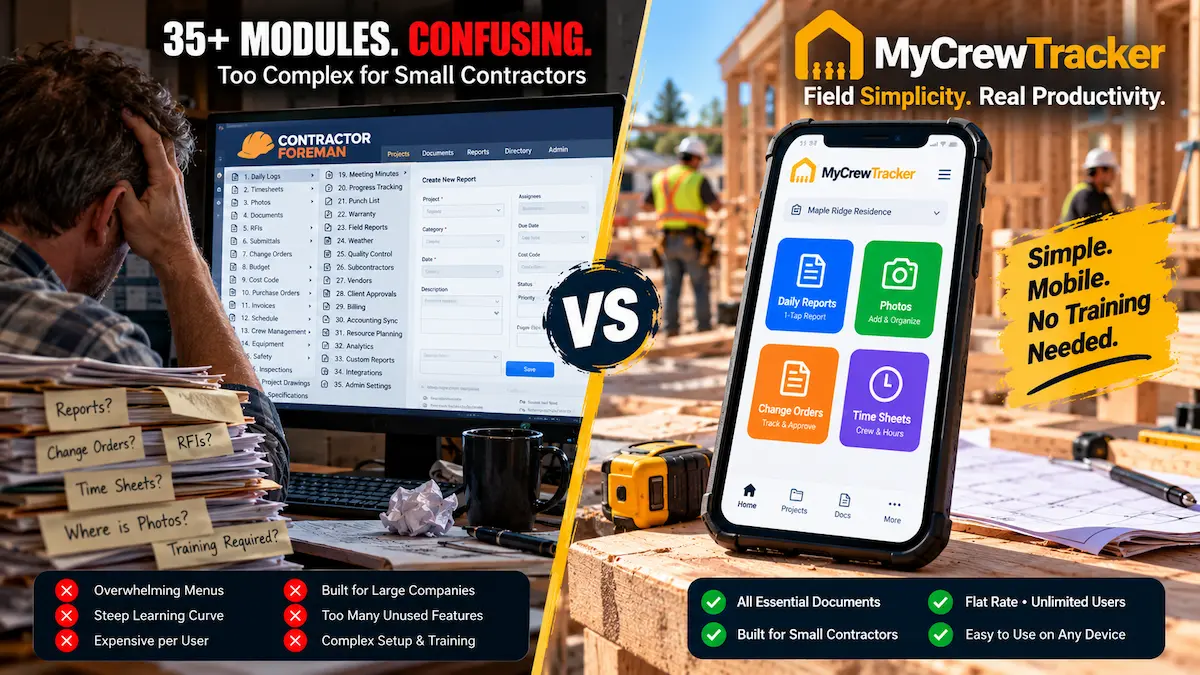
In construction management software, there is an uncomfortable industry truth that sales demos rarely mention: the best software in the world is completely useless if your field crew refuses to open it.
For small general contractors, custom home builders, and commercial trade subcontractors (electrical, plumbing, HVAC, framing, and concrete), software adoption is won or lost in the field. When your lead carpenter or project foreman is standing in the rain, wearing muddy work boots, balancing a clipboard on the tailgate of a truck, they do not want a 35-module desktop ERP system. They need to log today's crew hours, attach four site photos, record a weather delay, and capture an on-site client signature on an unexpected Change Order in under two minutes.
If an app requires eight clicks, three sub-menus, and five mandatory data-entry fields just to upload a photo, your crew will abandon it within three weeks. They will quietly revert to what actually works: sending blurry photos via text message, scribbling hours on cardboard scrap, and writing notes on paper napkins.
In the budget construction software market, Contractor Foreman and MyCrewTracker represent two fundamentally opposing philosophies:
- Contractor Foreman: The "feature-maximalist" approach. Offers 35+ modules—from estimating and Gantt scheduling to equipment tracking and vehicle maintenance—crammed into a desktop-first menu grid, priced on strict user tiers that jump rapidly as your team grows.
- MyCrewTracker: The "frictionless adoption" approach. Uses a proprietary Dual-Mode Architecture: field foremen get Easy Desk (a clean 20-tool mobile view that requires zero training), while the back office gets Pro Mode with QuickBooks bidirectional sync and Smart AI plan spec search—all at a flat $40/month billed annually ($480/yr) or $60/month month-to-month with unlimited users and unlimited projects.
Below is an unvarnished 2026 teardown comparing real-world field usability, pricing tier jumps, administrative overhead, and total cost of ownership between Contractor Foreman and MyCrewTracker.
The Software Adoption Trap: Why Feature-Packed Apps Fail on the Job Site
Every year, thousands of small general contractors and trade business owners make the same costly mistake: they evaluate construction software from the comfort of an air-conditioned office on a 27-inch dual-monitor workstation.
During a 45-minute desktop software demonstration, seeing a platform with 35 distinct menu items feels impressive. You see modules for CPM scheduling, bid invitations, vehicle mileage, submittals, safety meetings, tool tracking, purchase orders, client portals, and warranty logs. The business owner thinks: "Look at everything we get for the money! This will organize our entire company!"
Then Monday morning arrives on the job site:
The Tailgate Reality Check: Your framing foreman is trying to log that the drywall delivery blocked the crane access for 2.5 hours. He pulls out an iPhone with dirty fingers in bright direct sunlight. He opens the app and is confronted with a dense menu of 35 modules. He has to remember: Is a delivery delay under "Daily Logs," "Incidents," "Schedule Conflicts," or "Deliveries"? He clicks "Daily Logs," then has to select the project, select the phase, select the cost code, toggle four sub-tabs (Labor, Notes, Materials, Subs), and fill out ten required form fields before hitting save.
What happens next? The foreman closes the app, mutters under his breath, and sends a 4-word text to the owner: "Drywall blocked crane 2hrs."
That text message has no certified NOAA weather data, no GPS timestamp, no photos linked to contract drawings, and zero legal enforceability. When the owner attempts to charge back the drywall supplier or seek an extension from the commercial GC two months later, the claim is rejected for lack of contemporaneous documentation. The business owner continues paying hundreds of dollars each month for software that nobody in the field actually uses.
Contractor Foreman Teardown: 35+ Modules vs. Steep Field Friction
Contractor Foreman was created with a clear and admirable mission: provide small-to-midsize contractors with an affordable alternative to enterprise behemoths like Procore and Buildertrend. Rather than charging $12,000 to $25,000 per year on construction volume, Contractor Foreman bundled virtually every feature imaginable into a low-cost subscription.
On paper, the feature list is massive. Contractor Foreman includes:
Office & Financial Modules
- Estimating & Cost Code Takeoffs
- Invoicing & Progress Billing
- Purchase Orders & Work Orders
- Bid Management & Vendor Portal
- Critical Path (CPM) Gantt Scheduling
- Vehicle & Equipment Maintenance
Field & Job Site Modules
- Daily Logs & Weather Tracking
- Time Cards & GPS Geofencing
- Punch Lists & Safety Meetings
- Photo & File Storage
- Submittals & RFIs
- Incident Reports & Toolbox Talks
So where does Contractor Foreman run into trouble? In the user experience architecture.
Contractor Foreman was engineered primarily as a desktop database application that was subsequently adapted for mobile screens. The interface relies heavily on deep menu trees, dense tabular lists, and multi-tabbed modal windows.
For a full-time office project manager seated at a desk, this level of granularity is fine. But for a trade subcontractor running 3 to 10 crew members across multiple residential job sites, this design creates severe friction:
- Excessive Taps for Core Tasks: Completing a basic daily log requires moving across multiple separate tabs: Crew/Labor, Subcontractors, Notes, Weather, Materials, and Attachments. Foremen frequently skip entire sections because completing them is too tedious on a phone.
- Cluttered Mobile Navigation: Navigating a sidebar menu containing 35 options on a 6-inch phone screen inevitably leads to mis-taps and frustration.
- Lengthy Onboarding Curve: You cannot hand Contractor Foreman to a newly hired crew lead or a drywall sub and expect them to use it immediately. It requires hours of video tutorials, webinar training, and constant office oversight to enforce compliance.
Contractor Foreman Pricing in 2026: Hidden User Caps & Tier Penalties
Contractor Foreman advertises itself as one of the most budget-friendly systems on the market. However, when small contractors inspect the fine print, they quickly discover the User Cap Trap.
In 2026, Contractor Foreman structures its pricing into four tiers, with a substantial price surge between annual commitments and flexible month-to-month billing:
| Plan Tier | Annual Billing (Effective/mo) | Month-to-Month Billing | User Limit | Key Practical Constraint |
|---|---|---|---|---|
| Standard | $49 / mo ($588/yr) | $79 / mo | 1 User Only | Completely useless for crews; cannot give a field foreman his own login. |
| Plus | $87 / mo ($1,044/yr) | $166 / mo | Up to 3 Users | Owner + 1 PM + 1 Foreman hits the limit immediately. |
| Pro | $123 / mo ($1,476/yr) | $249 / mo | Up to 8 Users | Adding a 9th crew member or subcontractor forces another plan jump. |
| Unlimited | $166 / mo ($1,992/yr) | $332 / mo | Unlimited Users | Costs up to $3,984/yr on monthly billing just to avoid seat caps. |
Notice what happens to a growing general contractor or remodeler:
If you start on the Standard Plan ($49/mo), only one person can log in. To give your lead carpenter or job foreman access so they can log daily reports and snap photos from the job site, you are forced to jump to the Plus Plan ($166/mo month-to-month). When your team expands to two foremen, an office bookkeeper, and two crew leads who clock in on mobile phones, you blow past the 3-user cap and are pushed to the Pro Plan ($249/mo month-to-month).
By contrast, MyCrewTracker costs a flat $40/month billed annually ($480/yr) or $60/month month-to-month. There are no user limits, no user tiers, and no per-seat fees. Whether you have 2 crew members or 25 field workers and trade subcontractors, your price remains exactly the same.
The MyCrewTracker Solution: Dual-Mode Architecture (Easy Desk vs. Pro Mode)
Rather than trying to cram 35 desktop features into a single mobile interface, MyCrewTracker is built on a purpose-designed Dual-Mode Architecture. This system recognizes that field foremen and office managers have completely different tasks, screen sizes, and working environments.
Easy Desk (Mobile Field View)
Engineered for 100% Field Adoption
A streamlined mobile interface featuring exactly 20 rapid-action field tools arranged in large, glove-friendly visual cards.
- ✓ 90-Second Daily Reports: Automated NOAA weather logging, voice-to-text notes, and batch photo attachments.
- ✓ On-Site Change Order E-Signatures: Draft scope changes on your phone and collect the client's signature immediately on the tailgate.
- ✓ One-Tap Time Tracking: GPS-verified crew clock-ins and job code allocation without complex navigation.
- ✓ Zero Training Curve: Any subcontractor or apprentice can master it in 5 minutes without opening a manual.
Pro Mode (Back-Office Hub)
Executive Oversight & Financial Sync
A powerful management dashboard for the general contractor, project manager, and financial administrator.
- ✓ Smart AI Spec & Plan Search: Upload 100+ page architectural plan sets and ask natural language questions in seconds.
- ✓ Bidirectional QuickBooks Sync: Seamlessly push approved time cards, invoices, and job costs directly into QuickBooks Online.
- ✓ Contractual RFI Tracking: Maintain an unalterable audit trail of requests for information, clarifications, and engineering approvals.
- ✓ Subcontractor Compliance: Track certificates of insurance (COIs), W-9s, and lien releases across every active project.
By decoupling field logging (Easy Desk) from complex administrative management (Pro Mode), MyCrewTracker eliminates the field friction that kills software adoption. Your foremen never see confusing accounting menus, and your office manager never has to decipher hand-scrawled notes.
Head-to-Head Comparison: Contractor Foreman vs. MyCrewTracker
To help you make an objective, data-driven software evaluation, here is how Contractor Foreman and MyCrewTracker compare across key operational capabilities in 2026:
| Feature / Dimension | Contractor Foreman | MyCrewTracker |
|---|---|---|
| Starting Monthly Price | $79/mo (1 User) / $166/mo (3 Users) | $60 / mo (Unlimited Users) |
| Starting Annual Price | $49/mo ($588/yr, 1 User Only) | $40 / mo ($480/yr, Unlimited Users) |
| User Caps & Tiers | Strict tiers (1, 3, 8, Unlimited) | Zero caps. Unlimited users on all plans. |
| Field Architecture | Desktop ERP ported to mobile app | Dual-Mode: Easy Desk (Mobile) + Pro Mode |
| Number of Modules | 35+ sprawling modules | Focused 20-tool field desk + executive hub |
| Daily Report Completion Time | 7 to 12 minutes (multi-tab data entry) | Under 90 seconds (voice + NOAA auto-fill) |
| Weather Automation | Basic manual/auto weather sync | Automated NOAA certified meteorological stamps |
| Change Order E-Signatures | Included (complex multi-step setup) | Instant mobile creation & tailgate client e-sign |
| QuickBooks Online Sync | Yes (higher plan tiers) | Yes (Bidirectional, included on all plans) |
| AI Plan & Spec Search | Not available | Smart AI vector search across multi-page blueprints |
| Crew Onboarding Time | 3 to 7 days (webinars & video tutorials) | Under 5 minutes without training |
| Contract Lock-In | Annual contract required for lowest price | No long-term contracts; cancel anytime |
3-Year Total Cost of Ownership: Real-World Math for a 10-Person Team
When evaluating software costs, looking only at the entry-level sticker price is deceptive. You must evaluate what your company will pay over a 3-year period as your crew headcount fluctuates with seasonality and project volume.
Let us analyze a typical residential general contractor or commercial subcontractor with:
- 1 Business Owner / Estimator
- 1 Office Administrator / Bookkeeper
- 2 Project Foremen
- 6 Field Carpenters, Installers, or Trade Techs
- Total Active Users: 10 people
Contractor Foreman (Unlimited Tier)
Because 10 users exceeds the 8-user cap on the Pro Plan, this company must purchase the Unlimited Plan.
MyCrewTracker (All Features Included)
Includes unlimited users, unlimited projects, Dual-Mode Easy Desk, QuickBooks sync, and Smart AI spec search.
Bottom-Line Financial Result: Over 3 years, choosing MyCrewTracker saves this 10-person crew between $4,536 and $9,792 in direct software subscription fees. When you add the labor savings of foremen spending 90 seconds on daily logs rather than 10 minutes navigating nested menus, the net return on investment exceeds $15,000.
Frequently Asked Questions: Contractor Foreman vs. MyCrewTracker
Can my field foremen really learn MyCrewTracker in under 5 minutes?
Yes. MyCrewTracker's Easy Desk mode was designed with a single design rule: if a field tool cannot be understood immediately by someone who has never touched the app before, it is redesigned. The interface displays large, high-contrast visual cards for core actions: "Daily Log," "Take Photo," "Clock In," "Change Order," and "Punch List." There are no sub-menus or hidden tabs.
Does Contractor Foreman have better estimating and CPM scheduling?
If you are an engineering contractor or a midsize commercial builder who relies on formal Critical Path Method (CPM) dependency links, Gantt chart scheduling, and heavy line-item bid solicitations, Contractor Foreman provides those tools out of the box. However, for 90% of small residential remodelers and specialty trade contractors, CPM scheduling software goes unused because job schedules change daily based on weather, subs, and client selections. If your primary need is field accountability, daily reports, time cards, and getting paid for extra work, MyCrewTracker delivers a dramatically faster, more reliable solution.
What happens when I hire seasonal workers or bring on trade subcontractors?
With Contractor Foreman, adding seasonal laborers or giving a plumbing sub access to view drawings can bump you into a higher pricing tier, instantly doubling your monthly cost. With MyCrewTracker, you have unlimited user accounts on every plan. You can add 5 seasonal laborers for summer framing, give 3 trade subcontractors access to project punch lists, and delete or deactivate them when the project finishes without paying a single extra penny.
How does QuickBooks integration differ between the two apps?
Both platforms integrate with QuickBooks Online. However, Contractor Foreman reserves certain advanced sync capabilities for its higher-priced tiers. MyCrewTracker includes full bidirectional QuickBooks Online synchronization on all plans—allowing you to sync customers, job cost codes, employee time sheets, and invoices directly between the field and your accounting software without tier restrictions.
The Final Verdict: Which Platform Fits Your Construction Business?
Both Contractor Foreman and MyCrewTracker offer massive cost advantages over enterprise construction giants like Procore and Buildertrend. Choosing the right one comes down to where your company's biggest operational bottleneck lies:
Choose Contractor Foreman if:
- You have a dedicated in-office project manager who spends 40 hours a week on a desktop computer managing data.
- You require formal CPM critical path Gantt charts and deep bid solicitation management.
- You manage equipment fleets and vehicle maintenance schedules inside your primary PM software.
- Your field crew is already disciplined with digital apps and won't get frustrated by multi-tab mobile forms.
Choose MyCrewTracker if:
- Your foremen and trades currently use text messages and paper notebooks because complex software failed on the job site.
- You need 100% field compliance with a 90-second mobile daily report and automated NOAA weather stamps.
- You want to eliminate unbilled extra work with mobile Change Orders and immediate client e-signatures on site.
- You refuse to pay per-user penalties or upgrade tiers just because you hired more field workers.
- You want flat, transparent pricing: $40/month billed annually ($480/yr) or $60/month month-to-month with unlimited users.
Stop Paying for Software Your Field Crew Won't Use
Equip your field leads with Easy Desk for 90-second daily logs and give your back office Pro Mode with QuickBooks sync and Smart AI spec search. Unlimited users for one flat rate.
