
In residential remodeling, roofing, siding, electrical, framing, and plumbing work, jobsite photographs are your company's single most valuable operational and legal asset. A clear, timestamped photograph of a plumbing rough-in before sheetrock goes up proves you installed the pipes to code. A GPS-tagged photo of rotted roof decking before tear-off justifies an urgent change order to an insurance adjuster or homeowner.
For years, CompanyCam has been the standard recommendation for construction photo documentation. It solved a massive problem that plagued trade contractors for a decade: ending the chaos of jobsite photos getting hopelessly lost across personal camera rolls and unsearchable group text threads.
However, as we move through 2026, small contractors and specialty trade crews are confronting an uncomfortable financial and operational reality:
- The Per-Seat Surprise: CompanyCam charges per user per month. Plans start at $24 to $34 per user per month (or $29 to $39/mo on monthly billing), with team bundles climbing to $119–$249/month for small crews. If you have 8 to 15 crew members, you are spending $2,500 to $4,500+ every year strictly for a photo gallery.
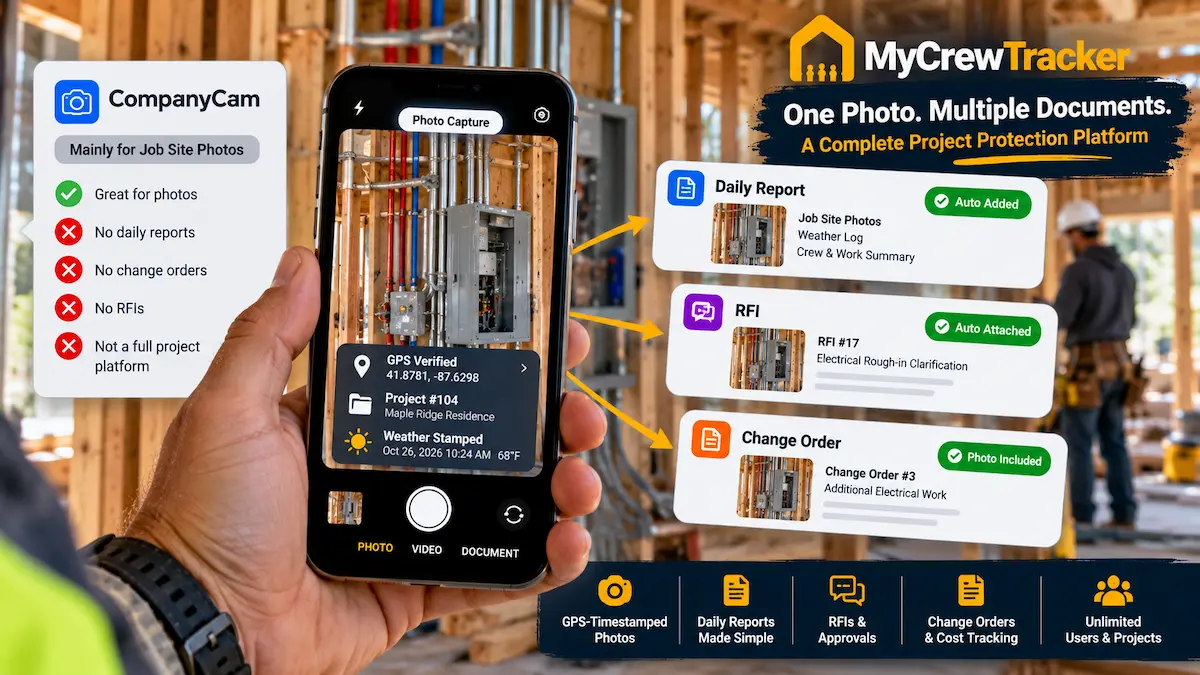
- Single-Purpose "App Stack Fatigue": While CompanyCam organizes photos well, it does not manage contractual Change Orders, cannot generate complete Daily Reports with automated NOAA weather, does not track crew payroll hours, and lacks native bidirectional QuickBooks accounting integration.
- The Multi-App Subscription Trap: To run an actual construction business, contractors end up paying for CompanyCam ($200/mo) + ClockShark ($120/mo) + Raken ($150/mo) + Dropbox ($40/mo)—burning over $500 to $600 each month on disconnected single-purpose apps.
That is why contractors are switching to MyCrewTracker. For a flat $40/month billed annually ($480/yr) or $60/month month-to-month, MyCrewTracker delivers unlimited users, unlimited projects, and unlimited full-resolution GPS-timestamped photos—fully unified with automated daily logs, mobile change order signatures, time sheets, and Smart AI spec search.
CompanyCam Pricing in 2026: The Per-Seat Surprise
When contractors first look at CompanyCam, the sticker price seems reasonable. But CompanyCam enforces strict per-user seating that quickly scales as your company grows:
| Crew Size (Field + Office) | CompanyCam Pro ($24/user/mo annual) | CompanyCam Premium ($34/user/mo annual) | MyCrewTracker (Flat Rate) |
|---|---|---|---|
| 3 Users (Owner + 2 Foremen) | $864 / yr | $1,224 / yr | $480 / yr |
| 6 Users (Owner, PM, 3 Foremen, Sub) | $1,728 / yr | $2,448 / yr | $480 / yr |
| 10 Users (Field Crew + Office) | $2,880 / yr | $4,080 / yr | $480 / yr |
| 15 Users (Growing Trade Contractor) | $4,320 / yr | $6,120 / yr | $480 / yr |
The Unintended Consequence of Per-User Photo Fees
When you pay $24 to $34 per seat each month, what does a business owner naturally do? They ration licenses.
You give a license to your project manager and lead superintendent, but you don't buy seats for your framing apprentices, your electrical helpers, or your specialty drywall subcontractors. When those un-licensed workers discover an unforeseen jobsite condition (such as dry rot behind stucco or unexpected plumbing lines in a load-bearing wall), they don't have access to the app. They snap a photo on their personal phone and text it to the foreman.
Within three months, you are back to square one: photos scattered across personal camera rolls and unsearchable messaging apps, missing GPS tags, and zero legal chain of custody. By contrast, MyCrewTracker's unlimited user model ensures that every laborer, subcontractor, and trade specialist on your site has access at zero additional cost.
What CompanyCam Does Well (And What It Leaves Out)
To be completely fair, CompanyCam is a well-designed tool for its specific purpose. Its photo capture is snappy, its before/after photo slider is excellent for social media marketing, and its geo-fencing reliably sorts pictures into project folders.
However, construction management requires much more than just a camera app. Here is what CompanyCam leaves out:
No Signed Change Orders
Taking a photo of hidden termite damage does not guarantee payment. You need a formal contractual Change Order with itemized labor, material costs, and an immediate digital signature from the owner or GC superintendent on site. CompanyCam cannot do this.
No Automated Daily Reports
Photos without daily field context fail in court. You need an automated Daily Report that pulls official NOAA weather data (temperatures, rainfall, wind) and logs crew headcounts alongside progress photos.
No Crew Time Tracking
CompanyCam does not track crew attendance or hours. Contractors must purchase an additional time tracking app like ClockShark or busybusy ($80–$150/mo) to track hours for payroll.
No Native QuickBooks Sync
CompanyCam has integrations with CRM software (like JobNimbus or Roofr), but it does not provide native bidirectional synchronization with QuickBooks Online or Desktop for project accounting, job costing, and invoicing.
The Legal Value of Court-Ready Photo Evidence in Construction Disputes
In construction litigation and payment arbitration, photographic evidence is evaluated under strict evidentiary standards. A random photo stored in a standalone photo gallery is easily contested:
- "When exactly was this photo taken?"
- "Can you prove the weather conditions matched what you claim caused the delay?"
- "Did the General Contractor know about this condition on that specific afternoon?"
Under Federal Rule of Evidence 803(6) (Records of a Regularly Conducted Activity), business records are granted high credibility when they are created contemporaneously in the normal course of business. When your jobsite photo is automatically integrated into a verified Daily Field Report—complete with automated NOAA weather logs, crew headcounts, and verified GPS watermarks—it becomes airtight, dispute-proof evidence that insurance carriers and arbiters cannot dismiss.
The Danger of "App Stack Fatigue": The $500/Month Frankenstein
When small contractors buy single-purpose software, they inevitably build what industry analysts call a "Franken-stack":
| Operational Function | Typical Tool Used | Average Monthly Cost (10 Users) | Annual Cash Outlay |
|---|---|---|---|
| Jobsite Photos | CompanyCam (Pro Plan) | $240 / mo | $2,880 / yr |
| Crew Time Tracking & GPS | ClockShark or busybusy | $100 / mo | $1,200 / yr |
| Daily Field Logs | Raken (Performance Plan) | $150 / mo | $1,800 / yr |
| Cloud Storage for Drawings | Dropbox Business | $45 / mo | $540 / yr |
| Total Multi-App Stack | 4 Disconnected Apps | $535 / mo | $6,420 / yr |
Look at that total: $6,420 every single year for four different subscriptions. Worse, none of these tools communicate seamlessly. When your foreman takes a photo in CompanyCam, he has to manually export it to attach it to a Raken daily log. When hours are logged in ClockShark, your bookkeeper has to re-type them into QuickBooks.
Contractors are paying premium enterprise prices for a fragmented collection of point solutions.
A Day in the Life: Multi-App Chaos vs. MyCrewTracker Simplicity
To understand why point solutions fail in the field, compare the daily experience of a lead foreman managing an active residential remodel:
The Multi-App Nightmare (CompanyCam + Point Solutions)
- 7:00 AM: Foreman opens App #1 (ClockShark) to clock in 4 crew members. One apprentice forgot his password.
- 11:30 AM: Plumber discovers buried galvanized pipes not on original plans. Foreman opens App #2 (CompanyCam) to take photos and tag the room. He texts the GC superintendent with photos. The GC says "looks good, proceed," but no formal change order is signed.
- 4:30 PM: Shift ends. Foreman opens App #3 (Raken) to type out the daily report. He has to export 3 photos from CompanyCam to his camera roll, then upload them into Raken. He manually checks the weather app to note rainfall.
- Result: 3 separate apps, 25 minutes of evening paperwork, and an unbilled $1,400 plumbing modification that the homeowner disputes three weeks later.
The MyCrewTracker Unified Workflow (Easy Desk)
- 7:00 AM: Foreman taps 1 button on Easy Desk to mark crew attendance. Hours are automatically tied to the active cost code.
- 11:30 AM: Plumber uncovers buried pipe. Foreman taps Change Order, snaps 2 photos, types labor and material costs, and hands his phone to the GC on site for an immediate digital signature. Approved PDF is emailed instantly to the owner and office.
- 4:30 PM: Foreman taps Daily Report, dictates his afternoon summary via voice-to-text in 60 seconds. MyCrewTracker automatically appends NOAA weather data and attaches the day's timestamped photos. Done in under 2 minutes.
- Result: 1 unified app, 90 seconds of field time, and a fully authorized $1,400 change order in the bank.
How MyCrewTracker Replaces the Entire Stack for $40/Month Flat
MyCrewTracker eliminates stack fatigue by combining photo documentation directly into the operational fabric of your jobsites:
1. Full-Resolution, GPS-Verified Photo Logs
Snap photos inside MyCrewTracker on iOS or Android. Every image is automatically watermarked with:
- Exact GPS coordinates (latitude/longitude verified to the project address)
- Military-grade timestamp (date, hour, minute)
- Current NOAA weather conditions (temperature, sky condition, humidity)
- Project name, phase, and photographer ID
2. 1-Click Photo Embedding into Contracts and Daily Logs
Instead of photos sitting isolated in a gallery, MyCrewTracker connects them directly to legal documentation. With one tap, a foreman embeds photos into:
- Construction Daily Reports: Giving GCs and owners clear visual proof of daily progress.
- Change Order Directives: Showing immediate photographic evidence of unseen site conditions to justify additional costs before work starts.
- Punch Lists: Documenting before-and-after resolution of finish items to speed up final retainage release.
3. Built-In Crew Attendance & QuickBooks Sync
Foremen record crew attendance and hours on the same screen where they log photos. Daily time sheets synchronize natively with QuickBooks Online and Desktop, eliminating the need for ClockShark or busybusy.
Side-by-Side Comparison: CompanyCam vs. MyCrewTracker
| Feature / Capability | CompanyCam (Pro Tier) | MyCrewTracker |
|---|---|---|
| Monthly Pricing (10 Users) | $240 – $290 / mo | $40 / mo (annual) or $60 / mo |
| User / Seat Limit | Strictly billed per seat ($24–$34/mo) | Unlimited Users Included |
| Project / Storage Limit | Unlimited photos | Unlimited Projects & Photos |
| GPS & Timestamp Watermarking | Yes (Excellent photo tags) | Yes (Court-ready verification) |
| Automated Daily Reports | No (Requires secondary software) | Yes (Automated NOAA weather) |
| Mobile Change Order Approvals | No (Photo markup only) | Yes (Instant digital e-signatures) |
| Crew Time Sheets | No (Requires separate time app) | Yes (Daily time cards included) |
| QuickBooks Integration | No (CRM integrations only) | Yes (Native 2-way sync included) |
| Smart AI Spec Search | No | Yes (Instant plan & spec answers) |
3-Year Cost Comparison: Saving $8,000+ on Field Software
Here is what the numbers look like over 3 years for a 10-person trade contracting team:
- CompanyCam (Pro Tier for 10 Users): $2,880/year × 3 years = $8,640 (and this is for photos alone—not including time tracking or daily reporting apps).
- MyCrewTracker (Flat Rate for 10 Users): $480/year × 3 years = $1,440 (covering photos, daily reports, change orders, time tracking, and QuickBooks sync).
You save $7,200 in direct cash on photo management alone—and more than $17,000 in total savings if MyCrewTracker replaces your standalone time clock and daily log subscriptions as well.
The Final Verdict: Who Should Choose What?
Keep CompanyCam If:
You are an exterior insurance restoration roofer who relies heavily on specialized roofing CRMs (like Roofr or JobNimbus) and your primary need is public before/after photo galleries for marketing. If you already have dedicated enterprise project management and have no issue paying $2,500–$4,000/year strictly for photo storage, CompanyCam remains a strong point solution.
Switch to MyCrewTracker If:
You are a small general contractor, remodeler, or trade subcontractor who wants to eliminate stack fatigue and consolidate your job photos, daily reports, change orders, and time cards into one affordable platform.
At a flat $40/month billed annually ($480/yr) or $60/month month-to-month with unlimited users and unlimited projects, MyCrewTracker delivers complete project protection without per-seat taxes.
Stop Paying Per-User Fees for Job Photos
Consolidate photos, daily reports, change orders, and time cards into MyCrewTracker today. Unlimited users and projects for just $40/month flat.
