
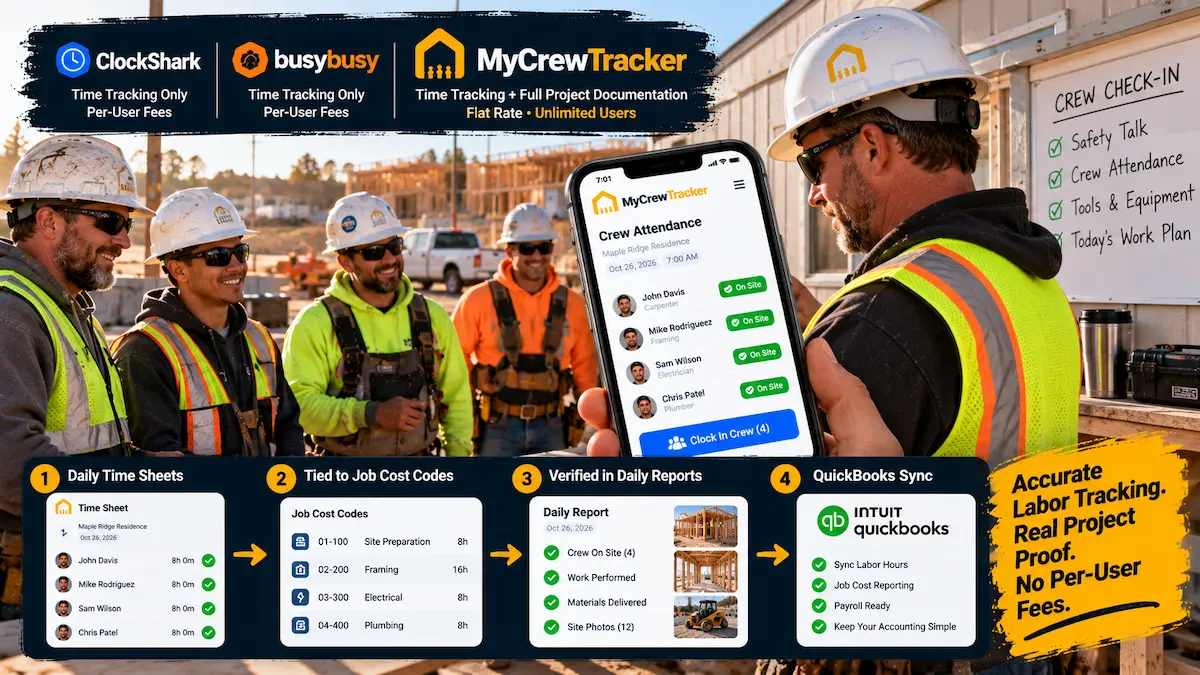
For small general contractors, residential remodelers, and specialty trade subcontractors (electrical, plumbing, HVAC, roofing, and concrete), labor is almost always your largest and most volatile project expense. If your crew bleeds just 15 minutes of unrecorded time per worker every day, or if billable extra hours fail to make it onto an invoice, thousands of dollars in hard-earned margin vanish every single month.
To eliminate timecard padding and buddy punching, many contractors invest in dedicated GPS time clock apps like ClockShark or busybusy. On the surface, these apps solve an obvious pain point: they allow field workers to clock in and out on a mobile smartphone with GPS geofencing and cost code tagging.
However, as trade business owners quickly discover, a standalone GPS time clock only solves one-third of the labor problem.
Knowing that an electrician or carpenter clocked in at 7:02 AM and clocked out at 3:34 PM does not prove:
- What work was physically completed: Did the crew finish the master suite rough-in or were they delayed by uncoordinated mechanical trades?
- Why delays occurred: Was time lost due to a severe weather shutdown that contractually entitles you to a non-compensable schedule extension?
- How extra out-of-scope work gets paid: When the owner requested additional recessed can lights on the fly, did that labor auto-populate into a signed Change Order before the crew packed up their tools?
When contractors realize standalone time clocks cannot answer these questions, they begin stacking additional software subscriptions: $120/month for a time clock, $149/month for a job photo app like CompanyCam, $50/month for cloud storage, and hours spent copying numbers into spreadsheets. Before long, a small 8-person crew is spending $300 to $450 every month on a disconnected mess of single-purpose apps.
That is why contractors are switching to MyCrewTracker. Instead of charging per-user fees for an isolated time clock, MyCrewTracker delivers a unified field management platform: GPS-verified Time Sheets seamlessly tied to 90-second daily logs, progress photos, client-signed change orders, and bidirectional QuickBooks sync—for a flat $40/month billed annually ($480/yr) or $60/month month-to-month with unlimited users and unlimited projects.
The Point-Solution Trap: Why Standalone Time Clocks Leave Contractors Vulnerable
In construction management, a "point solution" is software engineered to perform one narrow function exceptionally well while completely ignoring the broader project workflow. ClockShark and busybusy are classic point solutions. They are superb digital timecards.
The trap occurs when trade contractors assume that tracking hours is synonymous with tracking project progress and profitability. Consider a common real-world scenario on a commercial tenant improvement or residential custom remodel:
The $4,200 Time & Materials Dispute: Your framing crew of three spends 18 hours each over two days rebuilding a structural load-bearing wall that was framed incorrectly by the preceding builder. At the end of the week, your bookkeeper exports 54 total labor hours from ClockShark and sends a T&M invoice for $4,320 to the general contractor.
The GC's project manager immediately disputes the bill: "Your timesheet just shows hours clocked at the job address under code 'Framing.' We never approved extra hours. Where is your written directive? Where are the site photos of the damaged wall before you demoed it? Where is our superintendent's signed authorization?"
Because the time clock lived in an isolated app, the foreman had no seamless way to convert those 54 hours into an on-site Change Order with attached photo evidence and an immediate client e-signature. The subcontractor absorbs a $4,320 labor loss despite paying a monthly subscription for GPS time tracking.
Time data only protects your profit when it is contemporaneously tethered to daily job site documentation.
Pricing Teardown: ClockShark vs. busybusy vs. MyCrewTracker (2026)
Both ClockShark and busybusy monetize their software using per-user fees. This means every time you hire a seasonal laborer, bring on a full-time apprentice, or add an office assistant, your monthly overhead automatically ratchets upward.
1. ClockShark Pricing Structure
ClockShark charges a mandatory monthly base fee plus a per-user fee:
- Standard Plan: $40/month base fee + $9/user/month. Includes basic GPS tracking, job costing, and scheduling.
- Pro Plan: $60/month base fee + $11/user/month. Adds clock-out questions, PTO tracking, and advanced job costing.
For a small trade crew of 10 employees on the Standard plan, ClockShark costs $130/month ($1,560/year). On the Pro plan, it costs $170/month ($2,040/year). If your team scales to 15 workers in peak summer season, your monthly bill jumps to $225/month ($2,700/year)—strictly for punching a digital time clock.
2. busybusy Pricing Structure
busybusy offers a very basic free tier, but any serious trade contractor requires the Pro tier for GPS tracking, job costing, and supervisor sign-offs:
- Pro Plan (Annual Billing): $9.99/user/month.
- Pro Plan (Month-to-Month): $14.99/user/month.
For a 10-person crew on flexible month-to-month billing, busybusy costs $150/month ($1,800/year). For 15 workers, it costs $225/month ($2,700/year).
3. The MyCrewTracker Flat-Rate Advantage
MyCrewTracker charges a flat $40/month billed annually ($480/yr) or $60/month month-to-month.
| Crew Size | ClockShark Standard ($40 + $9/user) | busybusy Pro ($14.99/user monthly) | MyCrewTracker (Flat Rate) |
|---|---|---|---|
| 5-Person Crew | $85 / mo ($1,020/yr) | $75 / mo ($900/yr) | $40 to $60 / mo ($480 to $720/yr) |
| 10-Person Crew | $130 / mo ($1,560/yr) | $150 / mo ($1,800/yr) | $40 to $60 / mo ($480 to $720/yr) |
| 15-Person Crew | $175 / mo ($2,100/yr) | $225 / mo ($2,700/yr) | $40 to $60 / mo ($480 to $720/yr) |
| 20-Person Crew | $220 / mo ($2,640/yr) | $300 / mo ($3,600/yr) | $40 to $60 / mo ($480 to $720/yr) |
With MyCrewTracker, you never hesitate to give an apprentice, seasonal laborer, or specialty subcontractor a login. You never pay a "headcount penalty" during your busiest summer months.
The Missing Link: Connecting Payroll Hours to Daily Reports & T&M Change Orders
Why does keeping time tracking inside your primary field management platform make such a monumental difference to your bottom line?
In MyCrewTracker, your timecards do not live on an isolated spreadsheet island. They form the foundational layer of an automated Contemporaneous Job Proof Chain:
GPS-Verified Mobile Clock-In
Workers clock in on their smartphones via Easy Desk mode. The system verifies their physical presence inside the project's GPS geofence without battery-draining continuous background tracking.
Automatic Integration into 90-Second Daily Reports
When the job foreman taps "Daily Report" at the end of the shift, today's clocked hours, headcounts, and trade categories auto-populate instantly. The foreman simply speaks a voice note summarizing progress, snaps three photos, and hits submit. Automated NOAA weather stamps are added in the background.
Instant Conversion to Signed T&M Change Orders
If three workers performed 4 hours of unanticipated structural repair, the foreman selects those specific labor hours and converts them directly into a Change Order on his phone. He captures the owner's or GC's digital signature right on the tailgate.
One-Click Bidirectional QuickBooks Sync
Approved timecards sync directly to QuickBooks Online for payroll execution, while billable change order hours flow straight into customer invoices with attached PDF proof.
Neither ClockShark nor busybusy can execute this workflow because they lack built-in contractual change order generation, client e-signature capture, and comprehensive daily reporting documents.
Head-to-Head Feature Comparison Matrix
Here is how ClockShark, busybusy, and MyCrewTracker stack up side by side in 2026:
| Feature / Capability | ClockShark | busybusy | MyCrewTracker |
|---|---|---|---|
| Monthly Cost (10 Users) | $130 to $170 / mo | $150 / mo | $40 to $60 / mo |
| User Pricing Model | Base fee + $9-$11/user | $9.99-$14.99/user | Flat Rate (Unlimited Users) |
| GPS Clock-In & Geofencing | Yes | Yes | Yes (Geofenced + Privacy-First) |
| Cost Code & Job Allocation | Yes | Yes | Yes (Easy Desk 1-tap select) |
| Daily Construction Reports | Basic field notes only | Basic daily summary | 90-Sec Legal Daily Logs + NOAA Weather |
| Tailgate Change Order E-Signatures | No | No | Yes (On-site client signature capture) |
| Job Photo Documentation | Basic photo attachment | Basic photo attachment | Unlimited photos, geotagged & project-filed |
| QuickBooks Online Sync | Yes | Yes | Bidirectional (Time, Invoices, Job Costs) |
| Smart AI Plan & Spec Search | No | No | Yes (Natural language blueprint queries) |
| Contractual RFI Management | No | No | Yes (Included in Pro Mode) |
QuickBooks Integration: Pushing Payroll Hours & Job Costs Without Duplicate Entry
One of the most exhausting administrative rituals for small contractors is the Sunday night payroll marathon. A bookkeeper or company owner spends 3 to 4 hours collecting scribbled paper slips, matching them against text messages, calculating overtime, and manually keying hours into QuickBooks Online.
While ClockShark and busybusy integrate with QuickBooks, they only pass raw payroll hours. If an employee worked on an out-of-scope customer change order, that cost code is frequently disconnected from the customer invoice, resulting in forgotten billing.
MyCrewTracker implements true Bidirectional QuickBooks Online Synchronization:
- Two-Way Project Mapping: When you create an active project or sub-customer in QuickBooks, it automatically mirrors in MyCrewTracker. Your foremen select approved cost codes from a clean dropdown without administrative setup.
- Instant Payroll Approval: Foremen review and approve daily timesheets on their phones. On Monday morning, the office administrator clicks "Sync to QuickBooks," pushing validated regular and overtime hours directly into QuickBooks Payroll.
- Direct Invoicing of T&M Hours: Hours logged against billable Change Orders flow directly onto draft QuickBooks invoices alongside attached PDF documentation and client signatures.
This eliminates human transcription errors, prevents double data entry, and accelerates your billing cycle by days.
3-Year TCO Analysis: The True Cost of Software Sprawl vs. Platform Consolidation
To understand the financial impact, let us calculate the 3-year software investment for a growing trade contractor with 12 field employees and 2 office staff.
Because standalone time clocks do not handle job photo management or legal documentation, this contractor is forced to maintain two separate subscriptions:
The "Software Sprawl" Stack
ClockShark + CompanyCam Multi-App Stack
The MyCrewTracker Solution
Time + Daily Logs + Photos + Change Orders
The Bottom-Line ROI: Consolidating your job site stack into MyCrewTracker delivers a net savings of $10,980 in direct software fees over three years. More importantly, your field crew only has to download and learn one mobile application.
Frequently Asked Questions: Construction Time Tracking & Job Proof
Can workers clock in if the job site has no cellular service?
Yes. MyCrewTracker features full offline functionality. When an employee clocks in or out in an underground garage, rural basement, or dead zone, the GPS coordinates and exact timestamp are cached securely on the local device. The moment the phone reconnects to cellular data or Wi-Fi, time records automatically synchronize with the central database.
Does MyCrewTracker drain worker batteries with continuous GPS breadcrumbing?
No. Many trade workers strongly resent apps that track their physical movements second-by-second all day long, and constant GPS polling drains phone batteries before lunchtime. MyCrewTracker utilizes a privacy-respecting geofence check at the moment of clock-in and clock-out. It confirms that the worker was physically on site when recording their time without tracking their personal movements during breaks or off-hours.
Can a foreman clock in his entire crew from one tablet or phone?
Yes. MyCrewTracker supports both individual employee smartphone access and a dedicated Crew Kiosk Mode. A project foreman or site superintendent can pull up the crew roster on an iPad or phone and clock in 5, 10, or 20 workers simultaneously with a single tap, allocating hours across specific cost codes instantly.
How does MyCrewTracker handle overtime and labor compliance?
MyCrewTracker allows you to configure standard 40-hour weekly overtime, daily overtime thresholds (crucial for states like California), and mandatory meal break tracking. Timesheets calculate regular and overtime hours automatically, flagging discrepancies before payroll export to QuickBooks Online.
The Final Verdict: Consolidate Your Jobsite Stack and Save Thousands
In 2026, paying $100 to $250 each month strictly for a standalone GPS time clock is an obsolete business practice. Field hours are only as valuable as the project documentation that backs them up.
Choose ClockShark or busybusy if:
- You are a pure service trade company that only needs basic digital timecards and route mapping without job documentation.
- You do not manage contracts, daily construction reports, weather delays, or client-signed change orders.
- You don't mind paying $9 to $15 per worker every month and having your software bill expand as your crew grows.
Choose MyCrewTracker if:
- You want to consolidate your time tracking, daily logs, job photos, and change orders into one seamless platform.
- You need rock-solid contemporaneous proof to defend your payroll hours and win delay claims.
- You want to eliminate unbilled work by turning extra field hours into client-signed Change Orders on site.
- You want bidirectional QuickBooks Online sync for instant payroll and job costing.
- You want transparent flat pricing: $40/month billed annually ($480/yr) or $60/month month-to-month with unlimited users and zero per-seat fees.
Upgrade Beyond a Standalone Time Clock
Capture GPS-verified hours, 90-second daily logs, and client-signed change orders in one app. Unlimited users for just $40/month.
