
You've read the feature lists. You've sat through the demos. You've heard the sales pitches about "digital transformation" and "AI-powered workflows."
None of it tells you what it actually feels like to run a construction company with AI in your pocket.
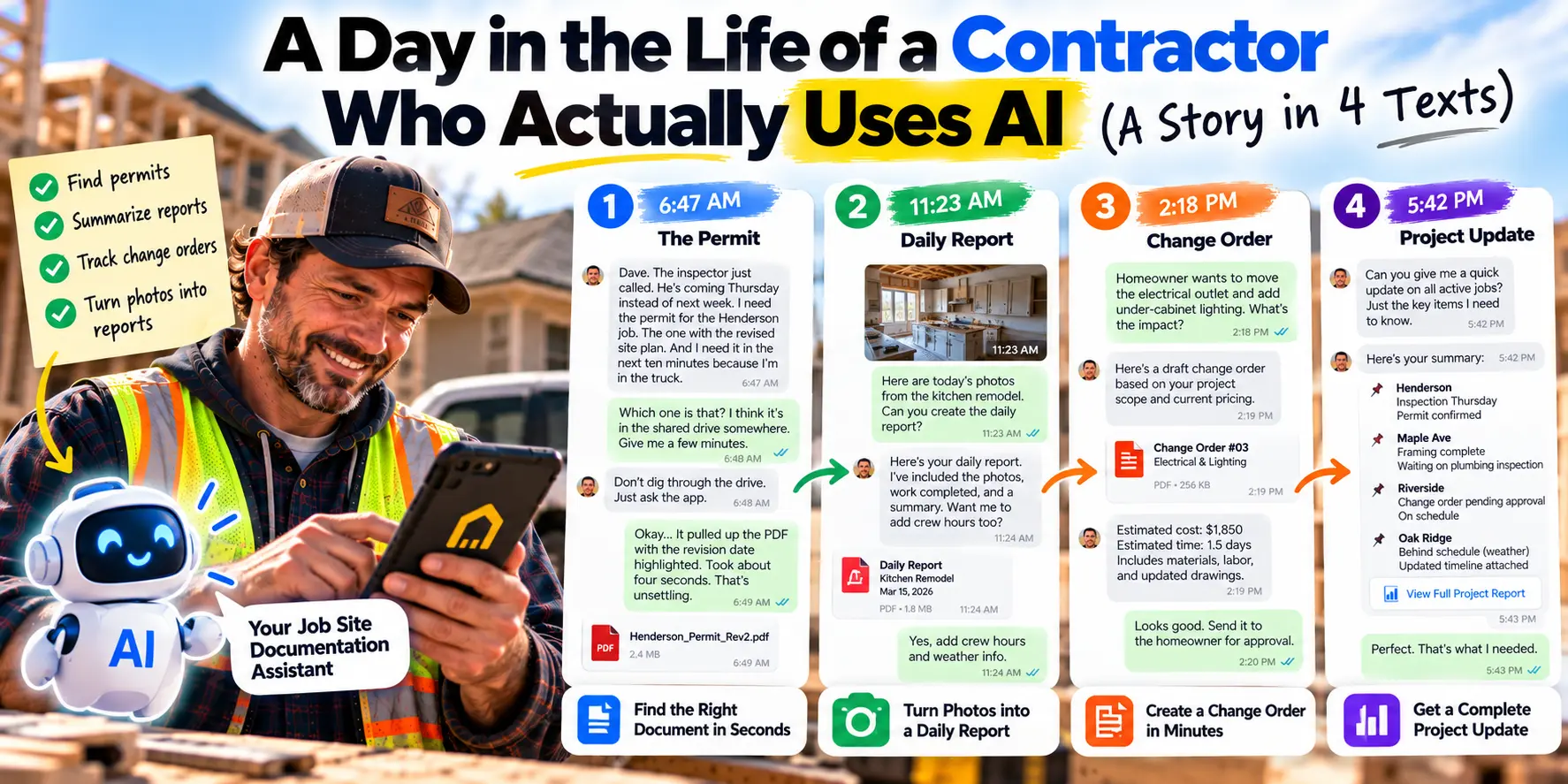
So here's the truth, told the way contractors actually communicate: through text messages. This is a real day—morning to night—from a small contractor who runs a five-person remodeling crew and uses MyCrewTracker's Smart AI Assistant to keep his jobs moving.
No feature lists. No jargon. Just four texts that show what changes when your documentation finally works.
6:47 AM — The Permit
Mike (contractor, to his project manager, Dave):
Dave. The inspector just called. He's coming Thursday instead of next week. I need the permit for the Henderson job. The one with the revised site plan. And I need it in the next ten minutes because I'm in the truck.
Dave:
Which one is that? I think it's in the shared drive somewhere. Give me a few minutes.
Mike:
Don't dig through the drive. Just ask the app.
Dave:
Ask it what?
Mike:
"Where's the approved permit for the Henderson job with the revised site plan?"
Dave:
…Okay. It pulled up the PDF with the revision date highlighted. Took about four seconds. That's unsettling.
Mike:
That's the point. Send it to the inspector. I'll print a copy for the site.
Dave:
Already done. Also it pulled up the inspection checklist for that permit type. Do you want me to send that to the crew?
Mike:
Yes. And add "confirm the setback is marked before Thursday" to the task list.
Dave:
Done. This is weird.
Mike:
It's not weird. It's just faster.
What just happened: Mike needed a specific permit buried in a project folder. In the old days, that meant a phone call to the office, a search through a shared drive, and a fifteen-minute delay while Dave scrolled through files with names like "Henderson_Permit_FINAL_v3_USE_THIS_ONE.pdf." With the Smart AI Assistant, Dave asked a question in plain English and got the answer—with the correct revision highlighted—in seconds. The permit went to the inspector. The crew got the checklist. The task list updated. Nobody wasted fifteen minutes. And nobody had to remember which file was the right one.
11:32 AM — The Drawing Revision
Mike (to his foreman, Carlos):
Carlos, are you working off revision C on the Henderson job?
Carlos:
I think so. I printed the set last week.
Mike:
The architect uploaded revision D this morning. The one with the changed window layout.
Carlos:
Great. So which one is right?
Mike:
Ask the app. "Show me the current window layout for the Henderson job."
Carlos:
Okay. It's showing me revision D with the change marked in red. And it's telling me revision C is superseded.
Mike:
That's the one. Pull it up on your tablet. Don't work off the printed set.
Carlos:
Good thing you caught this. We were about to frame the east wall this afternoon.
Mike:
That's why I asked. How much would that have cost us?
Carlos:
Reframing that wall? Probably four, five grand between labor and materials. Plus a day of delay.
Mike:
Exactly. Now pull up the AI and ask it to compare revision C and D. Tell me what else changed.
Carlos:
It's highlighting three changes. Window layout, a door swing, and a note about the exterior finish.
Mike:
Send me that comparison. I'll forward it to the architect so we're covered.
Carlos:
Done.
What just happened: Mike's crew was about to frame a wall using a drawing that had been superseded that morning. In the old days, that mistake would have cost thousands in rework and a day of lost production. The Smart AI Assistant let Carlos check the current drawing in seconds, confirm it was the right revision, and identify three additional changes he would have missed. The comparison went to the architect, creating a documented record that the crew was working from the current set. No rework. No dispute. No lost day.
2:18 PM — The Change Order
Mike (to Dave):
Client wants to add a skylight in the master bath. Verbal approval. I need to document this before I forget.
Dave:
Do you want me to create a change order?
Mike:
Yes. But first ask the app for the original scope on the master bath. I want to know what's already included.
Dave:
It pulled up the original scope, the spec section, and two photos from the rough-in. The ceiling framing is already in.
Mike:
Good. So the change is just the skylight and the flashing. Not the framing.
Dave:
Right. And the AI flagged that the original contract has a clause about roof penetrations. Do you want me to include the roofer's estimate?
Mike:
Yes. And add the photos from the rough-in to the backup package.
Dave:
Done. The change order is ready. $4,200. Do you want to send it to the client for signature?
Mike:
Send it. And log the verbal approval with today's date. If they dispute this later, I want the record.
Dave:
Already timestamped. Client got the email two minutes ago.
Mike:
That's how it should work. No "we'll sort it out later."
Dave:
Agreed. I'm adding this to the change order log. Nothing falls through the cracks this time.
What just happened: Mike got a verbal approval for a $4,200 change. In the old days, that verbal approval might have been forgotten, disputed, or eaten as a cost. With MyCrewTracker, Dave pulled the original scope, confirmed what was and wasn't included, flagged a contract clause, assembled the backup package with photos, and sent a timestamped change order to the client—all within minutes. The change is documented, the client has it in writing, and the record is complete. If the client disputes it later, Mike has everything he needs.
6:52 PM — The Sync
Mike (to his bookkeeper, Sarah):
Did the Henderson invoices go through?
Sarah:
They did. I saw them in QuickBooks an hour ago. The change order synced automatically.
Mike:
So I don't need to send you anything?
Sarah:
Nope. Everything from today is already in. The client approvals, the change order, the daily report, the photos. It's all there.
Mike:
So I can actually eat dinner with my family tonight?
Sarah:
That depends on your family. But you don't have to do any paperwork.
Mike:
That's a first.
Sarah:
Also, the job costing updated automatically. The Henderson job is still 4% under budget. The skylight change will push it to about 2% under.
Mike:
Good to know. I'll mention that at the client meeting tomorrow.
Sarah:
It's all in the report. I'll send it to your phone.
Mike:
Thanks. See you tomorrow.
Sarah:
Night.
What just happened: At the end of the day, everything Mike's crew documented—daily reports, photos, change orders, client approvals—synced automatically to QuickBooks. His bookkeeper didn't have to chase him for paperwork. His job costing updated in real time. He knew exactly where the Henderson job stood financially. And he didn't spend his evening sorting receipts or entering data. He ate dinner with his family instead.
What the Day Actually Shows
Four texts. One day. Here's what changed.
The permit was found in seconds, not minutes. No scrolling. No phone calls. No "which file is the right one?" Just a question and an answer.
The drawing revision was caught before it cost money. A superseded drawing was identified, a comparison was generated, and the architect was notified—all before the crew framed the wrong wall.
The change order was documented before it could be disputed. Verbal approval became a timestamped record with complete backup. Nothing was left to memory.
The day ended without paperwork. Everything synced automatically. The books were current. The job costing was accurate. And the contractor had his evening back.
None of this required a tech team. None of it required weeks of training. None of it required a $500/month subscription.
It required a tool that works the way contractors actually work—on a phone, in the field, with plain English questions and answers you can trust.
What This Means for Your Crew
The contractors who thrive in 2026 won't be the ones with the biggest software budgets. They'll be the ones whose documentation works—who find what they need in seconds, catch mistakes before they cost money, and close out the day without paperwork.
That's not a fantasy. It's a Tuesday.
MyCrewTracker includes a Smart AI Assistant for documentation built directly into its platform. At $40/month flat—with unlimited projects, unlimited documents, and unlimited users—it's designed for small crews who want practical AI without the enterprise price tag.
It comes with a 14-day full-feature free trial—no credit card required. Load a real project. Ask the AI a question. Send a change order. Sync to QuickBooks.
Then see if you eat dinner with your family.
Ready to have a day like this? Start your 14-day free trial of MyCrewTracker and load a real project this week. No credit card required.
