
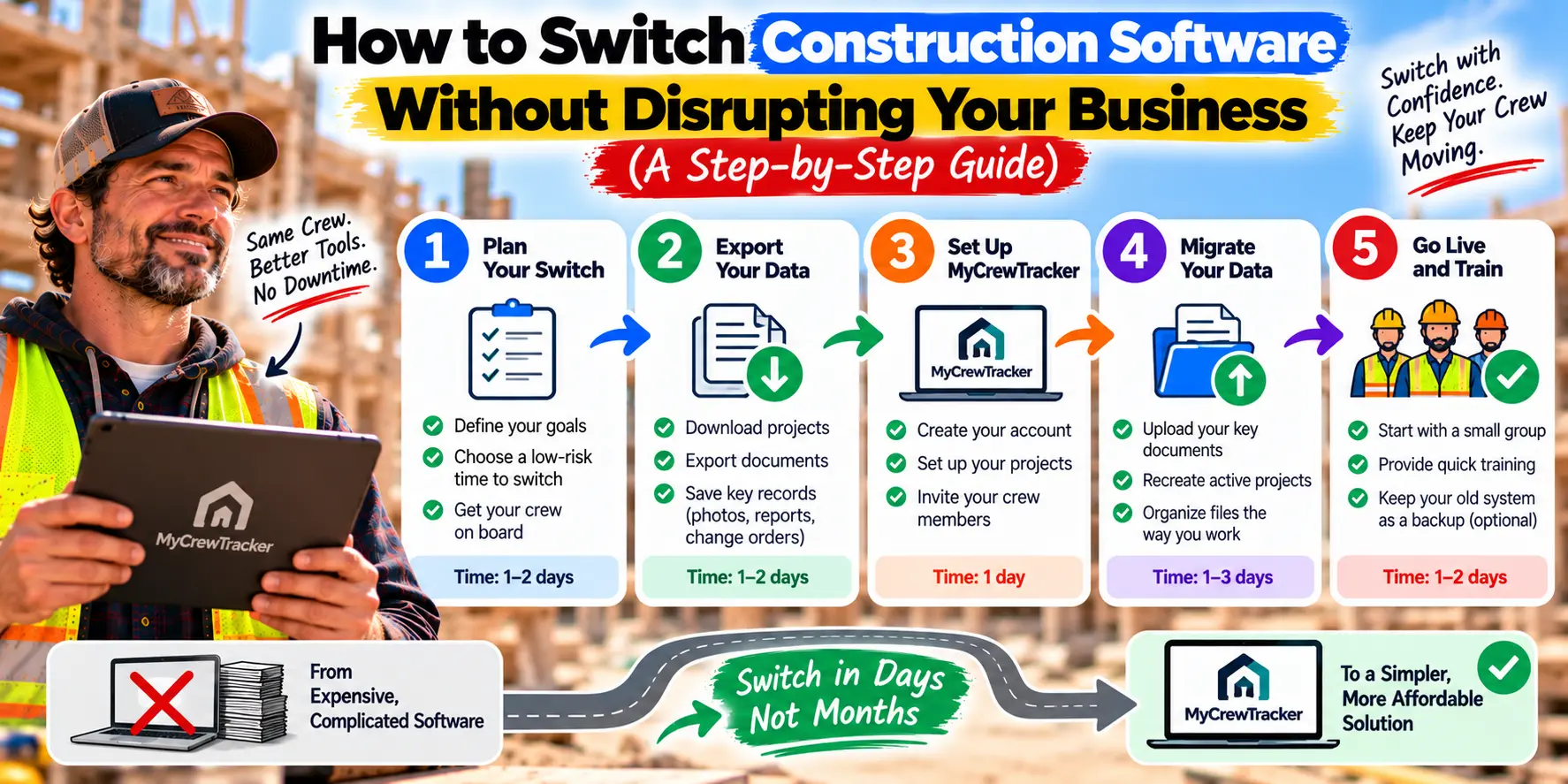
If you're thinking about switching construction software, there's probably a knot in your stomach right now.
You've done the research. You've seen the pricing comparisons. You know your current platform is costing you too much or missing features your crew actually needs. But every time you get close to making a decision, the same fear creeps in:
What if the switch disrupts everything? What if we lose data? What if my crew refuses to learn a new system? What if it takes months to get back to normal?
That fear is not irrational. It's based on real stories from contractors who tried to switch and got burned—by platforms that required months of implementation, by data migrations that lost critical records, by crews that rejected new software and went back to text messages.
But here's what most contractors don't realize: switching construction software doesn't have to be a major project. The platforms that require months of implementation and thousands of dollars in setup fees were built for enterprise companies. The platforms built for small crews are designed to be adopted in days, not months.
This guide walks you through exactly how to switch without disrupting your business—step by step, with a safety net that eliminates the risk.
The Fear Is Real (And You're Not Alone)
Let's start by acknowledging what you're afraid of, because every fear on this list is legitimate.
Fear #1: Data migration will be a nightmare. You've got years of project data, client contacts, financial records, and documents scattered across your current system. The thought of moving all of that—and potentially losing something critical—is terrifying. Research confirms this fear: switching platforms is "a major investment—not just in software, but in data migration, team training, and keeping active projects on track during the transition".
Fear #2: Your crew will reject the new system. You've seen it happen before. You bought software, trained everyone, and within a month they were back to text messages and paper. The "shelfware" phenomenon is real, and it's expensive.
Fear #3: You'll lose productivity during the transition. Construction doesn't stop for software migrations. You've got active projects, deadlines, and clients who don't care about your internal systems. Every hour spent on migration is an hour not spent on billable work.
Fear #4: You'll spend thousands on implementation and still not get value. Implementation costs for enterprise construction platforms range from $5,000 to $25,000 or more. That's money you might never recover if the software doesn't work out.
These fears are why so many contractors stick with software they've outgrown. The devil you know feels safer than the disruption you don't.
But here's the thing: the platforms that create these fears are the same platforms that cost too much in the first place. The platforms built for small crews don't have these problems.
The Myth: Switching Is a Multi-Month Project
The biggest misconception about switching construction software is that it takes months. That's true—for enterprise platforms.
Implementation for complex enterprise systems can take 12 to 24 months, with months 1–4 spent on needs analysis and system selection, and months 5–8 on core system implementation. For smaller firms with simpler needs, implementation still typically takes 2 to 6 weeks, and larger enterprises with complex integrations may require 6 to 10 weeks for full deployment.
But those timelines assume you're implementing an enterprise platform with custom configurations, complex integrations, and dedicated IT resources.
The platforms built for small crews don't work that way. They're designed for same-day setup. You create an account, load a project, invite your crew, and you're running. There's no implementation partner. There's no configuration phase. There's no IT department required.
The myth of multi-month migrations comes from enterprise software. For small crews, the reality is measured in days.
The 4-Step Switch Process (Without Disruption)
Here's how to switch construction software without disrupting your business. Four steps. No downtime. No lost data.
Step 1: Run in Parallel
Don't cancel your old software the day you sign up for the new one. Run both platforms side by side for two to four weeks.
Here's how it works:
- Week 1: Set up your new platform. Load one active project. Invite your foreman and your project manager. Don't ask anyone to stop using the old system.
- Week 2: Start using the new platform for specific workflows—like daily reports or change order tracking—while keeping the old system as your primary record. Compare the two. See how the new platform handles your real work.
- Week 3: If the new platform is working, start migrating active projects over. Make the new platform your primary system for new work. Keep the old system as a reference for historical data.
- Week 4: Once you're confident in the new platform, cancel the old subscription. Export any historical data you need to keep.
The key is that you never stop working. Your crew uses the old system until they're comfortable with the new one. There's no downtime. There's no "migration weekend." There's just a gradual transition that happens while you keep building.
Step 2: Import One Project First
Don't try to migrate all your historical data on day one. Start with one active project.
Here's why: your historical data is not as important as you think. You need access to past project records for reference and disputes, but you don't need them in your new platform from the moment you sign up. Most platforms let you export historical data and store it separately if needed.
What matters most is that your active projects are set up correctly. So start there.
- Load one active project into the new platform
- Add the drawings, specs, and permits for that project
- Invite your foreman and anyone else working on that project
- Run the project for a week and see how the platform handles it
Once you've proven the platform works on one project, add the next one. You can migrate your entire active project list in a week or two—without ever stopping work.
Step 3: Train Your Foreman on One Task
The biggest barrier to software adoption isn't technology. It's people. And the biggest risk isn't that your crew can't learn new software—it's that they won't try because it feels overwhelming.
The solution is simple: train on one task at a time.
Don't schedule a two-hour training session. Don't send a manual. Don't explain every feature.
Instead, show your foreman one thing: how to find a drawing. That's it. Show him how to open the app, find the project, and view the current drawing set.
That takes five minutes. And once he's used it for one thing, he'll figure out the rest.
The next day, show him how to take a photo and attach it to a daily report. The day after that, show him how to check the task list.
The goal isn't to teach the software. The goal is to make the software feel invisible. When your foreman can find what he needs in seconds without thinking about it, adoption happens naturally.
Step 4: Go All-In
After two to four weeks of parallel use, you'll know whether the new platform is working. If it is—and for most small crews, it is—it's time to go all-in.
- Make the new platform your primary system for all active projects
- Cancel your old subscription
- Export any historical data you need to keep for reference
- Tell your crew that the old system is gone
The transition period is over. You're running on the new platform.
And here's what you'll notice: nothing broke. Your projects kept moving. Your crew adapted. Your data is intact. The switch that felt terrifying a month ago is now a non-event.
The Safety Net: Why MyCrewTracker Is Built for Risk-Free Switching
The four-step process above works with any platform. But MyCrewTracker makes it even easier—because it was built specifically for small crews who can't afford disruption.
Here's what makes the switch risk-free.
14-Day Full-Feature Free Trial
No credit card required. No limited demo. You get access to every feature for two weeks. Load a real project. Invite your crew. Test the AI assistant. Create a change order. Sync to QuickBooks.
If it doesn't work for your crew, you walk away. No cost. No commitment. No hard feelings.
$0 Implementation Cost
MyCrewTracker doesn't charge setup fees. There's no implementation partner to hire. There's no configuration phase. You sign up, load a project, and start using it.
Enterprise platforms charge $5,000 to $25,000 for implementation. MyCrewTracker charges nothing.
Flat Pricing With Unlimited Users
At $40/month flat (billed annually), MyCrewTracker includes unlimited projects, unlimited documents, and unlimited users. Your whole crew can access the platform without per-user fees climbing. That means you can invite your foreman, your bookkeeper, and your subcontractors on day one—which is exactly what you need for a successful switch.
Mobile-First Design
Your crew works on phones, not desktops. MyCrewTracker works the same way. If your foreman can send a text message, he can use MyCrewTracker. There's no training manual. There's no learning curve. There's just a question and an answer.
No Data Lock-In
Your data belongs to you. If you ever decide to leave MyCrewTracker, you can export your project data and take it with you. No hostage situations. No "retrieving your data is a massive challenge" warnings.
What to Do Before You Switch
Before you start the transition process, take these three steps to make the switch even smoother.
1. Audit your current data. Understand what you have and where it lives. Which projects are active? Which are archived? Which documents do you need to keep? Which can you let go? This audit takes an hour and saves days of confusion later.
2. Pick your first project. Choose an active project that's mid-stream—not brand new, not almost finished. A project with a few months left is ideal because you'll have time to test the platform without the pressure of a deadline.
3. Talk to your crew. Tell them you're evaluating a new platform. Ask them what frustrates them about the current system. When your crew feels like part of the decision, they're more likely to adopt the new tool. When they feel like it's being imposed on them, they resist.
Common Mistakes to Avoid
Even with a simple four-step process, there are a few mistakes that can derail a switch. Here's what to watch for.
Don't migrate everything at once. Start with one project. Add more as you go. Migrating all your historical data on day one is a recipe for overwhelm.
Don't cancel your old software too early. Run in parallel for at least two weeks. You need a safety net while you're learning the new platform.
Don't train on everything. Teach one task at a time. Your foreman doesn't need to know every feature. He needs to know how to find a drawing and document a change. The rest will come.
Don't ignore your crew's feedback. If your foreman says the new platform is harder to use than the old one, listen. The right platform should make his life easier, not harder.
Don't expect perfection on day one. You'll have hiccups. A document will get misfiled. Someone will forget to upload a photo. That's normal. The goal is progress, not perfection.
The Bottom Line
Switching construction software doesn't have to disrupt your business. The fear is real, but it's based on enterprise platforms that require months of implementation and thousands of dollars in setup fees. The platforms built for small crews are different.
Four steps. Two to four weeks. No downtime. No lost data. No disruption.
And with MyCrewTracker, the risk is even lower. A 14-day full-feature free trial means you can test everything before you commit. $0 implementation cost means you're not paying for the privilege of switching. And flat pricing with unlimited users means your whole crew can adopt the platform without your costs climbing.
If you're stuck on software that's too expensive, too complex, or too slow, the switch is easier than you think. Start your free trial. Load one project. Run it in parallel for two weeks. See how your crew responds.
The worst that happens is you spend two weeks evaluating a tool that costs $40/month. The best that happens is you finally get your documentation under control—and wonder why you waited so long.
Ready to switch without the disruption? Start your 14-day free trial of MyCrewTracker and load your first project this week. No credit card required.
