
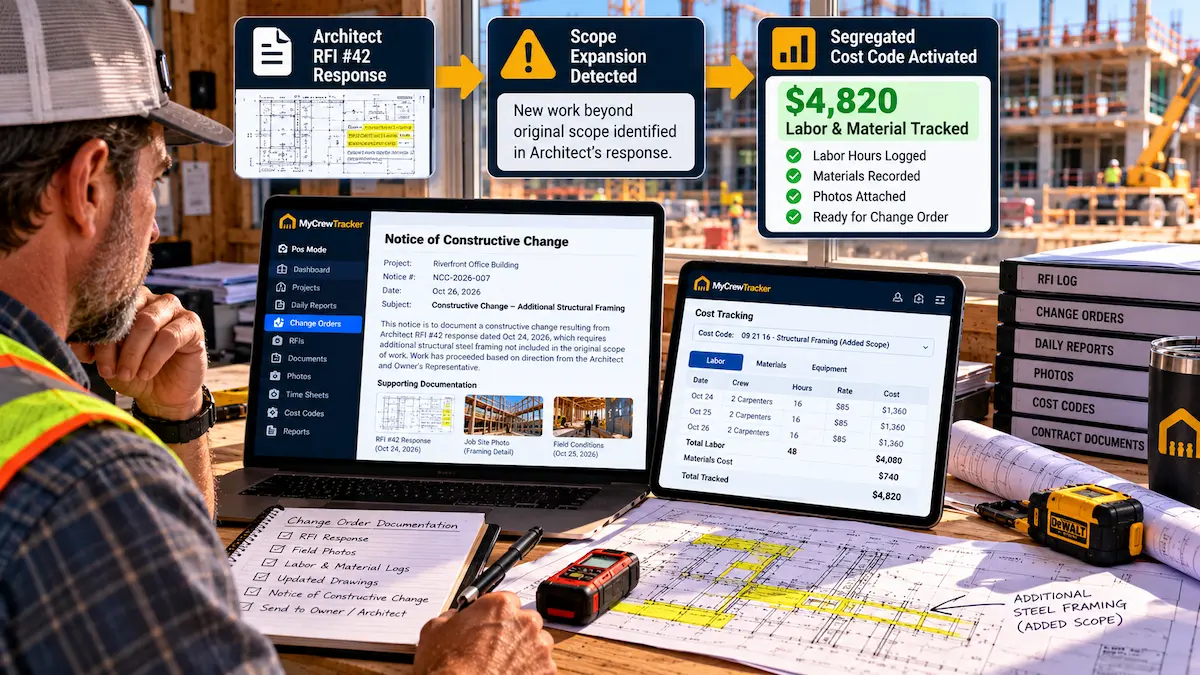
Every trade subcontractor and specialty contractor knows the feeling of being backed into a contractual corner. You are in the middle of a commercial renovation or multifamily build when the general contractor’s project manager or the architect hits you with a directive:
- "The architect’s RFI response clarifies that all conduit in the corridors must be concealed behind drywall, not surface-mounted, even though the contract drawings didn't show framing drops."
- "The owner’s third-party inspector is requiring Level 5 drywall finish on the stairwells instead of the specified Level 4."
- "We won't grant a 10-day weather extension, but you still have to hit the March 15th turnover date. Put on a second shift or you will be back-charged liquidated damages."
When you ask for a written, approved Change Order before starting the extra work, the response is cold: "That’s just scope clarification under your base contract. We are not issuing a change order. If you stop work or slow down the job, we will issue a 48-hour notice of default and supplement your crews at your expense."
If you blindly execute the work hoping to negotiate at closeout, you will be hit with the contract's strict "No Oral Changes" clause and forfeit every dime. But if you walk off the job, you risk termination and bonding claims.
There is a powerful legal doctrine designed specifically to rescue contractors from this trap: the Constructive Change Order. Below is the complete tactical guide on what a constructive change is, the five classic triggers, and the exact step-by-step documentation SOP required to protect your company and get paid.
What Is a Constructive Change Order? (Definition & Mechanics)
A formal change order is a bilateral, written agreement signed by the owner, general contractor, and subcontractor that modifies the contract scope, price, and schedule.
A constructive change order, by contrast, occurs when the owner or GC’s acts, conduct, orders, or failures to act force the contractor to perform work beyond the original contract scope—even though the owner/GC refuses to acknowledge the change in writing.
The Legal Test for a Constructive Change:
To prevail in arbitration or court on a constructive change claim, the contractor must satisfy two core legal elements:
1. The Change Element: You were directed or compelled to perform work that exceeded the reasonable requirements of the contract documents.
2. The Order Element: The compulsion came from someone with actual or apparent authority (the owner, architect, or GC), whether by verbal order, written directive, RFI reply, or schedule enforcement.
In simple terms: If it looks like a change, costs money like a change, and was ordered like a change, the law treats it as a change order—provided you give proper contemporaneous written notice.
The 5 Classic Constructive Change Triggers (With Real-World Examples)
Constructive changes rarely announce themselves with a red flag. They disguise themselves as project administration, quality control, or schedule management. Here are the five primary categories:
| Constructive Change Type | How It Happens in the Field | Contractor Financial Damage |
|---|---|---|
| 1. Erroneous Spec Interpretation via RFI | An RFI submitted to clarify an ambiguous duct route returns with an architect's sketch demanding heavy-gauge fire-rated dampers not shown in the mechanical schedules. | Material cost differences, specialized fabrication, and unbudgeted installation labor. |
| 2. Constructive Acceleration | A trade suffers an excusable delay (e.g., severe sub-zero weather, delayed predecessor steel erection). The GC denies the requested time extension and insists on the original turnover date. | Unbudgeted overtime premiums, shift differentials, extra supervisory staff, and trade stacking fatigue. |
| 3. Defective Plans & Impossible Specs (Spearin Doctrine) | Drawings depict plumbing riser lines passing through a structural post-tensioned beam that the engineer refuses to core drill. The contractor must re-engineer a multi-floor bypass. | Re-engineering costs, pipe rerouting, demolition of installed work, and idle crew standby time. |
| 4. Over-Inspection & Unreasonable Standards | An owner’s QA inspector rejects concrete slabs that meet standard ACI 117 tolerances, demanding costly diamond-grinding and surface skimming to meet an arbitrary mirror finish. | Unplanned remediation equipment rentals, abrasive consumables, and lost schedule momentum. |
| 5. Out-of-Sequence Work Directives | The GC directs the painting contractor to finish drywall before the mechanical trade completes duct insulation, resulting in ruined finishes from water testing leaks. | Extensive rework, repainting, double mobilization, and lost crew productivity. |
Bypassing the "No Oral Changes" Contract Trap
Almost every construction subcontract contains a clause that reads something like this:
"No extra work, alteration, or addition shall be performed, and no compensation shall be paid therefor, unless agreed upon in a written Change Order signed by Contractor’s Corporate Officer prior to commencement of such work."
When subcontractors perform extra work based on verbal directives from the GC’s field superintendent, GC attorneys routinely wield this clause to dismiss claims.
However, construction courts recognize two powerful counter-doctrines that neutralize this clause:
- Implied Waiver by Conduct: If the general contractor routinely accepted extra work, directed changes in the field, or promised compensation verbally on previous phases of the project, they have legally waived their right to strictly enforce the "prior written order" requirement.
- Contemporaneous Constructive Notice: If the subcontractor provides immediate written notification stating that the directive is deemed a constructive change and reserves all rights to additional cost and time, the GC cannot claim "lack of knowledge" or prejudice.
The 48-Hour Notice of Constructive Change SOP
To turn an unacknowledged directive into a legally enforceable claim, your project management team must follow this exact 4-step sequence:
Step 1: Deliver Formal Written Notice Within 48 Hours
Immediately upon receiving a directive, an RFI clarification that adds scope, or an acceleration order, send a formal Notice of Constructive Change. Do not wait until your monthly invoice. Under most commercial contracts, failure to provide written notice within 2 to 7 days extinguishes your claim entirely.
Step 2: Segregate All Costs Under a Unique Cost Code
The number one reason constructive change claims fail in arbitration is commingling of costs. If your electricians spend four hours on contract rough-in and four hours executing the constructive change, and the timecard simply says "8 hrs electrical rough-in," you have destroyed your evidentiary proof.
- Create an immediate sub-cost code in your time tracking system (e.g.,
CC-04: Reroute 4th Fl Conduit Directive). - Ensure every tradesperson working on the directive logs their exact hours against that dedicated phase code.
- Tag all delivery tickets, supplier invoices, and specialized tool rentals with the same code.
Step 3: Document Daily in the Field Log with Photographic Proof
Every daily report must state in unambiguous terms: "Crews executed work under protest pursuant to Notice of Constructive Change #04. Cumulative hours today: 24 journeyman hours. Photos taken showing rerouted alignment."
Step 4: Issue Contemporaneous T&M Tags for Daily Acknowledgment
Even if the GC superintendent refuses to sign a change order, have your foreman present a daily Time & Materials ticket for signature simply verifying hours and materials expended that day.
Formal Notice of Constructive Change Letter (Template)
Copy, customize, and issue this formal letter whenever you are directed to perform out-of-scope work without an approved change order:
// FORMAL NOTICE OF CONSTRUCTIVE CHANGE & RESERVATION OF RIGHTS
TO: [General Contractor / Project Manager Name]
PROJECT: [Project Name & Project Number]
DATE: [Date]
DIRECTIVE REF: [RFI # / Email / Verbal Directive Date]
SUBJECT: NOTICE OF CONSTRUCTIVE CHANGE ORDER & CLAIM FOR ADDITIONAL COST AND TIME
Dear [Recipient Name],
Please accept this communication as our formal written notice pursuant to Section [Article/Section number of contract] of the Subcontract Agreement that your directive issued on [Date] regarding [describe directive, e.g., RFI-112 requiring rerouting of chilled water piping around elevator vestibule / refusal of weather extension and demand for original milestone completion] constitutes a Constructive Change to our Subcontract Scope of Work.
1. Basis of Constructive Change:
The work directed exceeds the requirements of the original Contract Documents (specifically Drawing Sheets [List] and Specification Section [List]). This scope was not reasonably inferable at the time of bid and represents an addition/alteration to our contract obligations.
2. Performance Under Reservation of Rights:
To preserve the project schedule and avoid allegations of delay, we will proceed with the directed work under full reservation of all rights. Neither our compliance with this directive nor our continuation of work shall be construed as a waiver of our legal or contractual rights to equitable adjustment.
3. Segregation of Cumulative Costs:
We have established dedicated tracking phase [Cost Code #] to capture all direct labor, supervision, equipment, material, subcontractor costs, and loss of crew productivity directly resulting from this directive. Daily verification tickets will be presented to your field superintendent.
4. Schedule & Price Impact:
We anticipate an estimated cost impact of approximately $[Estimated Amount] and a schedule impact of [Number] calendar days to our substantial completion milestone. A comprehensive, itemized Change Order Request with full supporting documentation will follow within [10/14] days.
Sincerely,
[Your Name]
[Your Title / Trade Contracting Company Name]
The Field Script: How Foremen Stand Their Ground On Site
When the GC superintendent arrives at your work area fuming that you filed a formal Notice of Constructive Change, use this battle-tested conversation script:
Foreman Professional Field Script:
"Mark, we’re not slowing down your job. As you can see, our crew is actively executing the rerouting work you ordered this morning. But you and I both know that this wasn't on our contract drawings.
Our office sent the formal notice so our companies stay compliant with contract terms and so neither of us gets burned when the owner reviews the final accounting. All I need from you today is your signature on this daily ticket simply verifying that my three guys worked 6 hours on this line. You're not agreeing to the price—you're just verifying the headcount and hours so we have clean facts."
How MyCrewTracker Makes Constructive Changes Indisputable
Winning a constructive change dispute requires a continuous, unbroken chain of contemporary evidence. If your records have gaps, the general contractor’s claims consultant will exploit them.
MyCrewTracker gives trade contractors an unfair documentation advantage:
- Instant Cost Code Splitting: Allow foremen to split crew hours with one tap on a mobile device—recording base bid hours on code 01 and constructive change hours on code 02.
- Digital Daily Logs with Embedded RFI Cross-References: Automatically link daily field reports to specific RFIs, architectural revisions, and superintendent directives. Learn more in our Daily Reports Guide.
- Geotagged & Timestamped Photo Chains: Capture before, during, and after conditions with tamper-proof satellite timestamps and GPS verification. Explore Job Site Photo Documentation.
- On-Site Tailgate E-Signatures: Capture the GC superintendent's signature directly on your smartphone screen to verify daily crew counts before he leaves the trailer. Check out our Change Orders Feature.
Stop Doing Extra Work for Free
Equip your field foremen with instant cost code time tracking, tamper-proof daily reports, and mobile change order authorizations. Start protecting your project margin today.
