
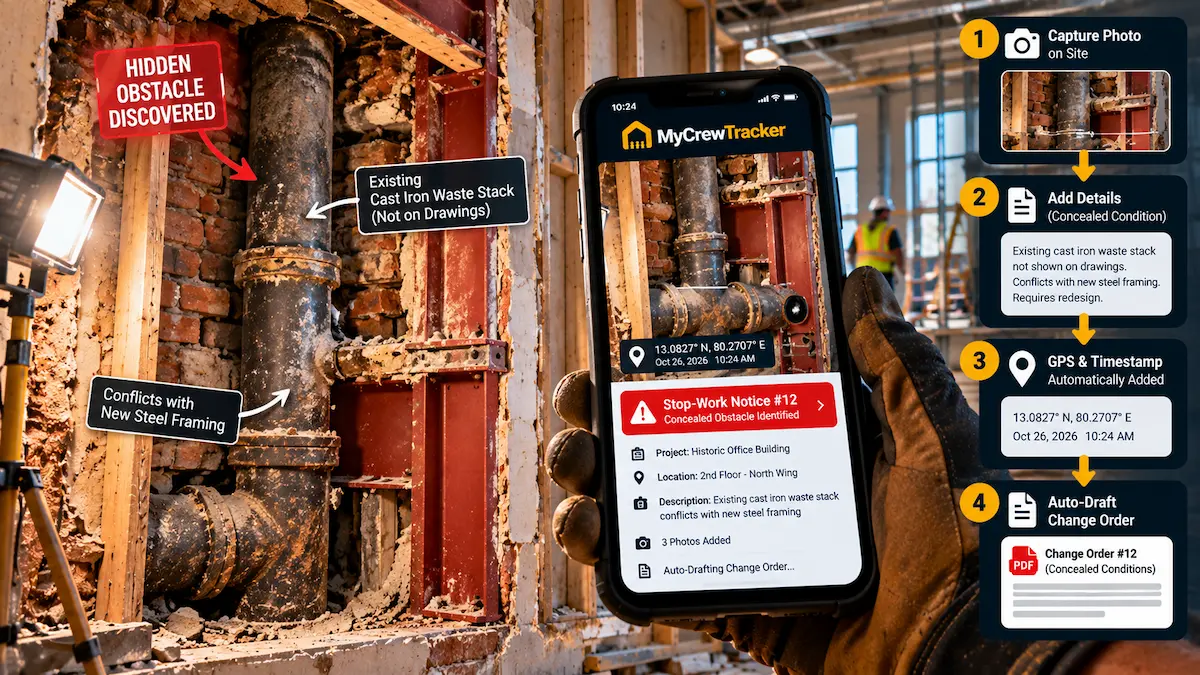
Every renovation contractor and commercial tenant-improvement (TI) superintendent knows that sickening stomach drop. Your crew peels back two layers of water-damaged drywall on an 1890 historic brownstone or cuts a trench through a 1970s commercial slab, and instead of finding the clean structural studs shown on the architectural drawings, you discover a nightmare:
- Load-bearing floor joists notched to paper-thin splinters by an unqualified plumber thirty years ago.
- Active, unmapped high-voltage electrical conduits encased in concrete directly across your planned plumbing trench.
- Sub-slab groundwater intrusion and decaying organic fill where bedrock was promised in the geotechnical report.
- Asbestos pipe wrap or hidden toxic mold colonizing the plenum ceiling above a retail storefront.
Fixing these unforeseen hazards will cost $14,500 in emergency labor, structural lumber, and specialty trade re-routing, while adding three weeks of critical-path delay to the project.
Yet when you present the change order to the building owner or the general contractor, you are met with familiar stonewalling: "You walked this building during the pre-bid site inspection. Your contract says you are responsible for examining the site and including all necessary demolition work in your base lump sum. We are not paying for this."
If you proceed without following a strict, legally recognized Concealed Conditions Documentation SOP, you risk either absorbing five-figure repair costs out of your own pocket or facing breach-of-contract allegations for unauthorized delays. Here is the exact field and contractual protocol required to prove, price, and recover 100% of your costs when concealed jobsite conditions strike.
Differing Site Conditions: Type I vs. Type II Concealed Conditions
In construction jurisprudence—including standard contracts published by the American Institute of Architects (AIA A201 Section 3.7.4) and ConsensusDocs 200 (Section 3.16)—unforeseen site conditions are categorized as Differing Site Conditions (DSC). Understanding the distinction between Type I and Type II conditions is critical when drafting your initial change order request:
| Condition Classification | Legal Definition | Jobsite Examples | Burden of Proof for Contractor |
|---|---|---|---|
| Type I Concealed Condition | Physical conditions that differ materially from those expressly indicated or represented in the contract documents, drawings, or specifications. | Architectural plans show an 8-inch non-load-bearing metal stud partition, but opening the wall reveals an unmapped 14-inch structural masonry shear column carrying upper floors. | High: Must show the contract drawings positively indicated one thing, but physical reality was materially different. |
| Type II Concealed Condition | Unknown physical conditions of an unusual nature that differ materially from those ordinarily encountered and generally recognized as inherent in work of the character provided. | Unearthing an undocumented 1920s underground fuel storage tank or buried foundation rubble during slab excavation in an urban infill lot where drawings were silent. | Moderate: Must prove that a reasonably prudent contractor in that geographic region could not have anticipated the condition during pre-bid inspection. |
The owner's defense that "you should have anticipated this in your base bid" collapses under AIA A201 § 3.7.4 if you can demonstrate that the condition was:
- Subsurface or concealed behind existing finishes at the time of pre-bid walk-through.
- Not reasonably discoverable without destructive demolition or intrusive testing that the owner did not permit prior to contract execution.
- Promptly reported before disturbing the condition or covering it up.
The 3-Step "Stop Work & Do Not Disturb" Field Protocol
The most catastrophic mistake foremen make when discovering a concealed defect is attempting to "fix it on the fly" to maintain schedule. The moment your crew disturbs, alters, or removes a concealed condition without formal owner inspection, you compromise your legal right to claim a change order.
Why? Because the owner, architect, and structural engineer will argue that your premature demolition destroyed the physical evidence, making it impossible to verify whether the defect was pre-existing or caused by your crew's careless methods.
The "Golden Demarcation" Rule:
Immediately red-tag the affected bay, barrier off the hazard with caution tape, and order trades to stand down within the immediate zone of influence. Continue work only on unaffected, non-critical path scope while triggering the 3-step reporting SOP.
Step 1: Immediate Field Freeze & Perimeter Isolation
When concealed rot, undocumented MEP services, or structural anomalies are uncovered:
- Halt all pneumatic chipping, saw-cutting, or demolition within a 15-foot safety radius.
- Place physical barricades and warning signage: "STOP - CONCEALED STRUCTURAL CONDITION UNDER REVIEW."
- Direct crew members to transition to approved base-bid work in separate rooms or floors to mitigate non-productive standby labor.
Step 2: Contemporaneous 3-Tier Photographic Evidence Capture
Do not rely on a single, blurry smartphone photo. Take three distinct tiers of photographic proof before any cleanup begins:
- Tier 1 (Wide Establishing Shot): Shows room context, ceiling line, grid lines, or structural column markers that prove the exact location on the architectural floor plan.
- Tier 2 (Medium Relational Shot): Illustrates how the concealed obstacle connects to existing base-bid scope (e.g., how the undocumented sewer pipe intersects your proposed duct routing).
- Tier 3 (Macro Measurement Close-Up): Uses a tape measure, spirit level, or digital caliper held directly against the defect (e.g., showing a 2x10 joist rotted down to 3.5 inches of remaining solid timber).
Ensure every photo contains intact EXIF metadata (GPS latitude/longitude coordinates and immutable satellite timestamp). If litigation or arbitration arises months later, metadata is the unassailable proof that the defect existed before your team touched it.
Step 3: Issue Written Notice of Concealed Condition Within 24-48 Hours
Virtually every commercial contract contains a strict "Notice of Claim" clause. Under AIA A201 § 3.7.4, notice must be given within 14 to 21 days, but most subcontract agreements tighten this window to 24 to 72 hours. If you do not notify the owner in writing within that window, you automatically waive all rights to additional compensation and schedule extensions.
Pricing Concealed Conditions: Why You Should Never Bid Lump Sum
When an owner or GC receives a concealed condition notice, their immediate reaction is: "Send me a fixed lump-sum price to fix it by tomorrow morning so we can keep moving."
Agreeing to a lump-sum fix on a concealed condition is financial suicide.
Why? Because when a building hides one defect, it almost always hides three more. If you quote $8,000 to sister five rotted joists, and upon peeling back the next subfloor section you find that the supporting bearing wall header has dry rot from termite intrusion, you are now legally trapped under your own lump-sum change order to fix the entire assembly.
The 2-Phase Pricing Strategy
Protect your business by insisting on a two-phase contractual authorization:
-
Phase 1: Exploratory Demolition & Selective Investigation (Time & Materials):
Execute an interim T&M work directive authorizing 16 to 24 journeyman hours to selectively demolish surrounding finishes, expose the full extent of the structural/MEP defect, and allow the engineer of record (EOR) to inspect the bare assembly. -
Phase 2: Engineered Remediation (Lump Sum with Explicit Exclusions):
Once the structural engineer issues a formal sketch (SK) or repair detail, submit a formal change order request based on the engineered scope—complete with a clause explicitly excluding any further hidden defects beyond the exposed boundary line.
| Direct Cost Item | Description & Calculation | Justification Documentation |
|---|---|---|
| Standby Labor / Demobilization | Unproductive crew waiting time while engineer inspects site or crew reallocation transit. | Daily field report logs showing exact hours trades spent idle awaiting directive. |
| Specialty Shoring & Temporary Support | Hydraulic bottle jacks, adjustable lally columns, and timber needle beams to secure unstable loads. | Equipment rental invoices and stamped structural shoring plan. |
| Skilled Craft Remediation Labor | Journeyman carpentry, plumbing reroutes, or concrete stitching at fully burdened labor rates. | Daily signed Time & Materials tickets with foreman descriptions. |
| Overhead & Profit Markup | Contractual allowable markup (typically 10% Overhead + 10% Profit, or 15% combined). | Subcontract general conditions markup clause. |
| Schedule Extension & Time Impact | Non-working days added to contractual substantial completion milestone. | Critical path timeline comparison before and after discovery. |
Formal Notice of Concealed Condition Letter (Template)
Never rely on an informal text message or telephone conversation to notify an owner or general contractor of a concealed condition. Send this formal written notice via email and project management software within 24 hours of discovery:
// FORMAL NOTICE OF DIFFERING / CONCEALED SITE CONDITION
TO: [General Contractor / Project Owner Name]
PROJECT: [Project Name & Address]
DATE: [Current Date]
CONTRACT REF: Subcontract Agreement Dated [Date], Section [Reference]
SUBJECT: FORMAL NOTICE OF CONCEALED PHYSICAL CONDITION (AIA A201 § 3.7.4 / CONSENSUSDOCS § 3.16)
Dear [Recipient Name],
In accordance with the General Conditions of the Contract, please accept this communication as our formal written notice of a subsurface/latent physical condition discovered at the job site on [Date] at approximately [Time].
1. Specific Location:
[Identify exact grid lines, room number, elevation, or structural location, e.g., 2nd Floor North Suite, Grid Lines C-4 to C-6].
2. Description of Concealed Condition:
During scheduled demolition/trenching operations, our crews uncovered [describe condition, e.g., structural joist rot / unmapped cast-iron sewer main / high-voltage conduits encased in 4-inch concrete]. This condition was concealed behind existing architectural finishes, was not shown on Contract Drawing Sheet [Number], and could not have been discovered through reasonable visual inspection prior to contract execution.
3. Preservation of Evidence & Jobsite Status:
Pursuant to contract requirements, we have halted all work affecting this area and barricaded the zone to preserve the condition for your immediate inspection. No finishes or structural elements have been disturbed or removed.
4. Impact on Project Cost & Critical Path Schedule:
Remediating this condition requires an engineering review and constitutes out-of-scope extra work. This discovery directly impacts the critical path of the project. We anticipate an impact to the substantial completion milestone of approximately [Number] calendar days, in addition to associated direct labor, shoring, and material costs.
5. Action Requested:
Please coordinate an immediate on-site inspection with your superintendent and the Engineer of Record within [24/48] hours to inspect the condition and provide an authorized Work Directive or Change Order Request.
Sincerely,
[Your Name]
[Your Title / Trade Contracting Company Name]
The Jobsite Script: What Foremen Should Say When GCs Demand Quick Fixes
When the general contractor's superintendent walks into the room, his primary instinct is to preserve his schedule. He will often tell your foreman: "Just saw it off, sister in a 2x6, and keep rolling. We'll take care of you on the next pay app."
Train your foremen to use this exact professional de-escalation response:
Foreman Professional De-Escalation Script:
"Dave, I want to keep this job moving just as fast as you do, but our contract and building code prohibit us from disturbing an unmapped structural/plumbing condition without written engineering sign-off. If we cut into this without an RFI and a Work Directive, both of our companies take on massive structural liability, and my owner won't get reimbursed.
I've barricaded this bay and moved my crew over to framing the interior partitions in Suite B so we don't burn standby hours. I just submitted our timestamped photo log and formal notice through MyCrewTracker. Let's do a 5-minute walk-through right now, mark the boundary line, and sign an exploratory T&M ticket so we can legally get this exposed for the inspector."
This script accomplishes three vital things: it shows safety compliance, moves the crew to productive non-critical work to stop the bleeding, and immediately puts the burden of written authorization back on the general contractor.
How MyCrewTracker Locks In Concealed Condition Approvals in Minutes
When you uncover hidden rot or buried obstacles, speed and verifiable audit trails make the difference between getting paid $15,000 and writing it off as a business loss.
MyCrewTracker is purpose-built for trade subcontractors and remodelers dealing with rapid jobsite scope changes:
- Instant Timestamped & Geotagged Photo Capture: Snap high-resolution macro and establishing photos directly in the mobile app. The photos are permanently stamped with GPS coordinates, room numbers, and satellite time, creating tamper-proof courtroom evidence. Explore our Job Site Photos Feature.
- One-Click Notice of Concealed Condition: Generate and email a compliant AIA-style Concealed Condition Notice with embedded photos and floor plan references directly from your mobile phone while standing on the site.
- On-Site Tailgate Digital Signatures: Hand your phone or tablet to the GC superintendent or homeowner to countersign an exploratory T&M ticket or change order before the crew picks up a hammer. Learn more about our Change Orders Workflow.
- Real-Time Standby & Labor Cost Segregation: Track exact crew hours dedicated to exploratory demolition separately from your base-bid contract, syncing directly to your billing records and QuickBooks.
Never Eat Another Concealed Condition Repair
Equip your field foremen with instant photo logging, digital change order authorizations, and legal notice generation on any smartphone. Try MyCrewTracker free for 14 days.
